Saving or Exporting an Ad Hoc View
When you have completed your Ad Hoc View, you can save it as:
- A view, which other users can load and edit to refine the view for their purposes
- A report, which is a read-only version that other users cannot modify
Save both a view and a report
-
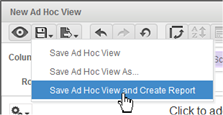
Hover over the Save pull-down icon on the tool bar and click Save Ad Hoc View and Create Report.
-
Populate both sides of the resulting dialog to make copies of both the view, and the read-only report.
Note:
Jasper will not allow you to use the same name. You can append “report” to the report name.
Export to a different format
Do this with the contents of the report after you run it.
-
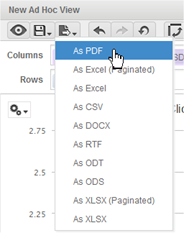
Hover over the Export pull-down icon and click whichever format you wish to export to.
-
The specific behavior you will see will differ by format type. For example, PDFs will open and then you will have a chance to save them. Most other file types will display a Windows dialog that lets you open or save the file.