Command Syntax
The typical Deployer command syntax is:
cd C:\apriori-platform\distribution\<version>\deploy\lib
java -jar .\apriori-reporting-wsclient.jar [-h host] [-n port]
-u <jasperlogin> -p <jasperpassword> -z "<reportname>.zip"
[-f <destination_folder_name>] [–y]
This possible options are:
| Option | Description | Default | Required? |
|---|---|---|---|
| -y | When specified, indicates that all defaults should be accepted without prompting, including deleting any existing deployment with the same name specified by the –f flag | n/a | no |
| -f | The destination deployment folder (for example, “aPriori”, “Custom”, “MyCompanyName”, etc.) | “aPriori” | no |
| -z | Full path to the report .zip file. For example, " C:\TEMP\custom_filename-MYSQL-16.2.1.3.zip" |
n/a | yes |
| -h | Host name of the aP Analytics/JasperReports® Serverserver | localhost | no |
| -n | Port number of the aP Analytics/JasperReports® Serverserver | 443 | no |
| -u | Jasperadmin username | jasperadmin | no |
| -p | Jasperadmin password | n/a | yes |
| --help | Show all of the Deployer command line options. |
For example:
java -jar .\apriori-reporting-wsclient.jar -h localhost -n 8543
-u jasperadmin -p jasperadmin
-z " C:\TEMP\component-cost-report-MYSQL-16.1.0.6.zip" -f aPriori -y
This example loads the Component Cost report into the aP Analytics/JasperReports® Server server on “local host” using non-standard SSL port 8543. The report package is located in C:\Temp on the same machine where the server is running. The destination folder in the JasperReports® Server server is “aPriori” and it will be placed in the “Reports” folder. “aPriori” is a top-level folder under the “Organizations folder.”
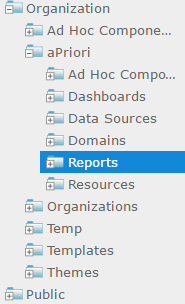
If you pass the name of an existing top-level folder like “aPriori”, the Deployer automatically stores the new report in the “Reports” sub-folder.
Note:
If the deployment folder already exists, you may be prompted (depending on the “-y” flag) whether to delete an existing deployment folder with the same name. If you respond “n”, the Deployer immediately exits. If you respond “y”, the existing deployment folder is removed and a new folder is created.
If the “Reports” folder does not exist, the Deployer creates it along with a Resources folder.
Note:
If the data source does not exist, the Deployer prompts for all data source input parameters to create the required data source. (The deployer tool can check the report package to determine which data source is needed.) All deployed reports should use data sources under the aPriori folder, even if the report is deployed to a different folder.