Scenario and System Data Exports
Administrators can use aP Admin to export costed scenario data or system data from an aPriori operational database, which can be accessed by applications such as aP Pro and aP Design but not by aP Analytics, to an aPriori reporting database that can be accessed by aP Analytics. Once the data has been moved to the reporting database it can also be accessed by other reporting packages and Business Intelligence products, and be integrated with other enterprise software solutions. For more information, contact aPriori Professional Services.
aP Admin can perform these two types of export:
- Scenario Export – Export costed component data. For more information, see Manage Scenario Export.
- System Data Export – Export users, Access Control groups, foreign exchange rates, and currency codes. For more information, see Manage System Data Export.
This figure shows how aP Admin allows administrators to define what to export (scenarios of costed parts, assemblies, roll-ups, and/or dynamic roll-ups, as well as system data such as users, groups, and currency information) and when to schedule the export of costed component data and system data from the aPriori operational database to the aP Analytics reporting database.
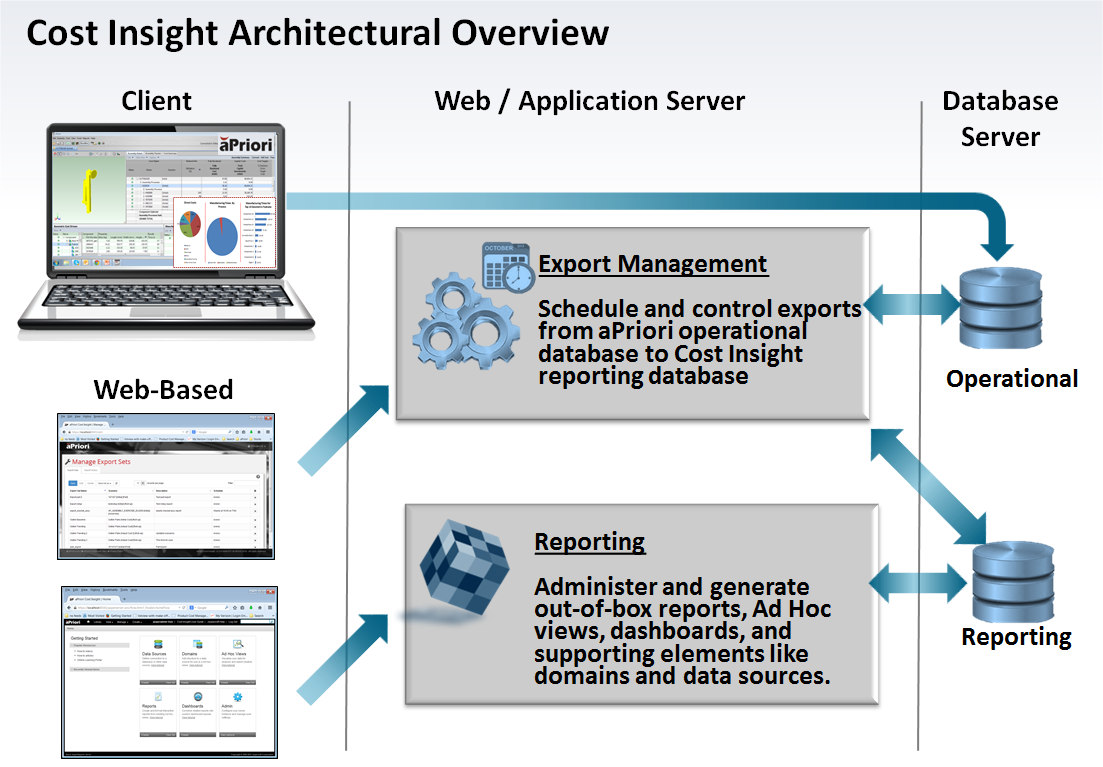
The reporting database opens the possibilities of working with other reporting packages and Business Intelligence products, and to integrate with other enterprise software solutions. For more information, contact aPriori Professional Services.