Ad Hoc Activity Reporting
Activity Reporting allows you to create a report based on the application log-in, session, and log-out activity of aPriori users.
All Activity Derived Table
The All Activity derived table enables reporting across user activity type, including login, logout, admin info, load cad file, open, edit, cost, publish, revert, refresh cost, delete, save, generate report, create comparison, set comparison, and save comparison. As shown in this figure of an Ad Hoc report, if an All Activity report is grouped by User Full Name and Session ID, the report includes the activity sequence of a single user within their login session.
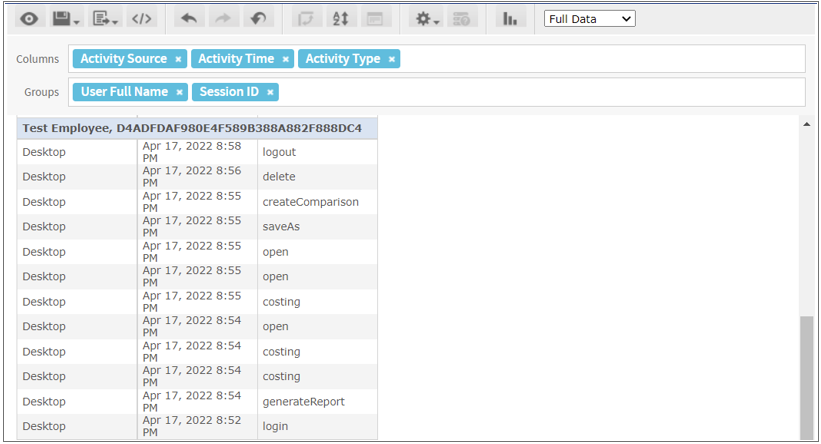
The Activity Source field, which is the first column in the figure, represents the aPriori application in which the activity occurred:
- Desktop corresponds to aP Pro
- A server name corresponds to either aP Admin or aP Design.
To report on the All Activity derived table, select All Activities as the source and use the Operational Ad Hoc Data domain in the aP Analytics Ad Hoc reporting tool. For more detailed reporting on an activity type, including part number and scenario name, select an activity-specific source such as Costing Activity.
Login, Logout, and Session ID Values
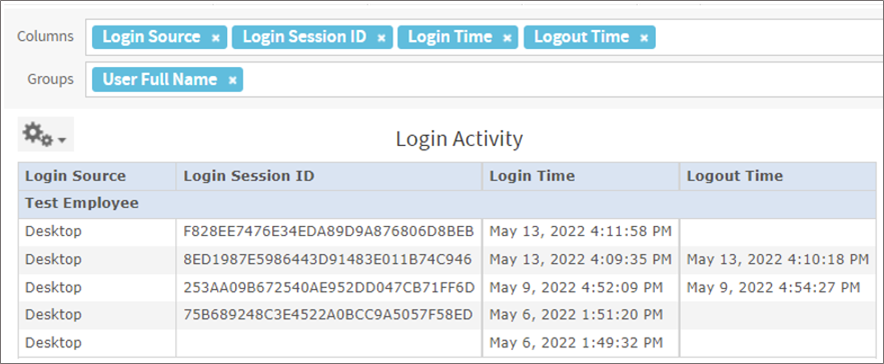
This figure shows an activity report that is grouped by User Full Name and includes these columns:
- Login Source – Value that corresponds to the aPriori application in which the log-in activity occurred:
- Desktop corresponds to aP Pro
- A server name corresponds to either aP Admin or aP Design.
- Login Time – Timestamp value that corresponds to the time that the user logged in to an aPriori application.
- Logout Time – Timestamp value that corresponds to the time that the user logged out of an aPriori application. If the logout timestamp value is empty, the user either:
- Is still active in a session.
- Has left the session open and is not actively engaging with the application.
- Has closed the application in a web browser tab but has not manually logged out of the application
- Session ID – Unique identifier for a user login session. If a record shows an empty session ID, the user attempted, but failed to log in to an aPriori application due to invalid credentials.