Scenario Sync Usage Notes
This section contains information about various topics that can affect the way you use Scenario Synchronization in your day-to-day operations.
Access Control Considerations
There are several important aspects of user access that you must consider when planning how to create and run Scenario Synchronization jobs.
- The Scenario Synchronization job will run under the account and privileges of the last person to create or modify the sync job. In other words, the person who logs into Scenario Synchronization and creates or edits a job is the person under whose account the job will run.
- To log in, the user must belong to the group defined by "
sync.admin.group=". -
The logged-in user must have two levels of access to ensure that the sync job runs correctly:
-
Component schema access -- You can ensure that the user has access to the component schema by clicking Tools > System Admin Toolset > System Administrator, then clicking Users. Select the username and click Edit User. In the resulting Edit User dialog box, expand the Schema Privileges drop-down menu and ensure that the necessary schemas are selected.
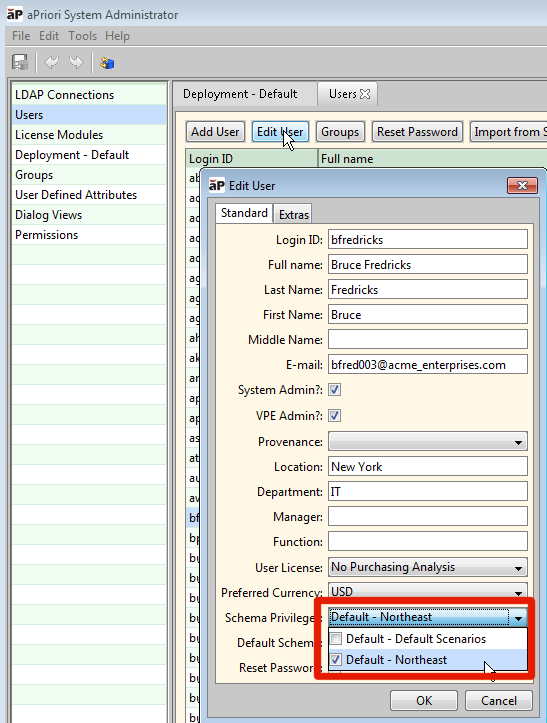
For general information about component schemas, see the "Managing Deployments" section of the aPriori System Administration Guide.
-
Access Control permissions -- If your deployment has implemented aPriori Access Control, you must also ensure that your logged-in user has the correct permissions to access ALL the components and subcomponents that will be involved in the synchronization process. If not, the job may fail or may return incomplete results. For example, consider a sync job for a dynamic roll-up that consists of a single assembly. If the account running the export job has access to the dynamic roll-up, and the assembly itself, but NOT to all the subcomponents in the assembly, the job will export everything to which the user has access, resulting in an incomplete export. For general information about Access Control, see the aPriori System Administration Guide.
-
What happens if your synchronization job runs without sufficient access to all the components and sub-components?
If the top-level roll-up or assembly cannot be accessed, an error is logged, and the job ends.
Otherwise, the job will continue and will synchronize every scenario to which it has access. An error message is logged for every scenario that the user cannot access. If some child components cannot be accessed, the assembly is only partially synchronized, and error messages are logged for those components that cannot accessed. (However, the job will not recurse and report all subcomponents that cannot be accessed below an inaccessible parent.)
Miscellaneous Notes
This section contains some rules or behavior guidelines to be aware of when using Scenario Synchronization.
- Scenarios are considered unique through a natural key defined as “part_number”, “scenario_name”, “scenario_type”, and “component_schema_name”.
- When evaluating two component scenarios with the same natural key, the one with the later timestamp will overwrite the other. An import never overwrites an existing newer scenario, even in the case where a scenario is nested within an assembly that is being imported.
- Scenario Synchronization has no limit as to the amount of data it can move in a single run, but large amounts of data can cause the operation to run for longer than is practical. The exact amount that can be moved will depend on several factors, including the frequency at which it is run, the network performance between the sites and the realm repository, and the hardware of the sites.
- An import will succeed even if the scenario that is being imported is locked on the importing site. The updated scenario will still be locked after the synchronization.
-
If you run an aPriori client and the Scenario Synchronization tool simultaneously, you may encounter the following behavior. To correct these conditions, exit and re-start the aPriori client:
-
After synchronization, the component image displayed in the viewer is not updated for the scenario. The old image is still displayed.
- After synchronization, the scenarios list for containers such as roll-ups and cost comparisons in the Navigation tree is not updated.
- Any subcomponent of an assembly which was updated during synchronization cannot be opened from the assembly.
- You may encounter an error while removing scenarios from the database.
Repository errors
When multiple sites are concurrently reading and updating the realm repository there may be situations where a sync job encounters an unexpected or missing file. If this happens the job will report a repository error with details about the conflict and will continue processing other scenarios. When a repository error is encountered it may be necessary to manually resolve the conflict by removing the offending scenario directory from the realm repository. Contact aPriori Customer Support if you need assistance.