Scenario Export Purge tab
Use this tab to clean out obsolete export set data from the reporting database.
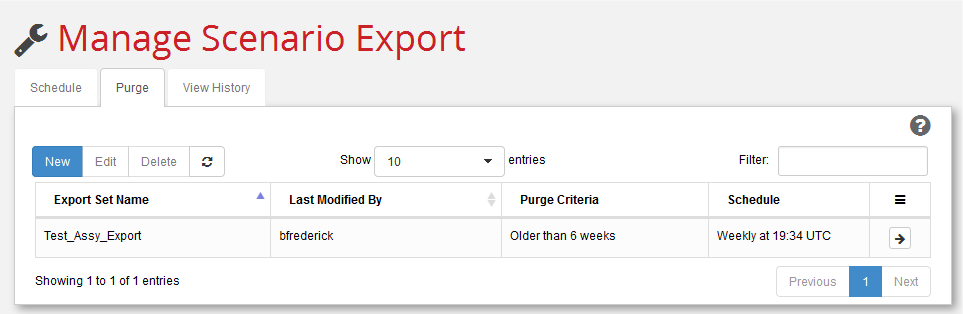
This tab is like the Schedule tab (see Scenario Export Schedule tab), except that the jobs you schedule here remove obsolete data from the reporting database instead of adding fresh data to it.
Consider the repeating exports that you have adding data over time and create corresponding repeating purge jobs that regularly clean out old data. (You can perform an immediate purge with the arrow ().
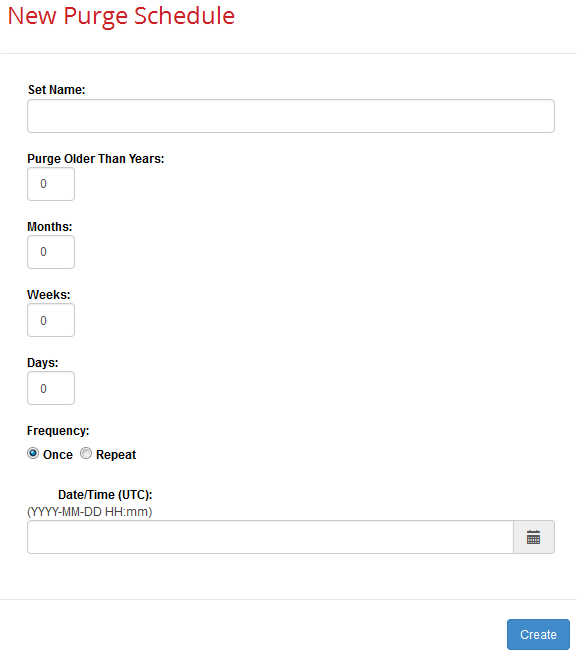
| Field | Description |
|---|---|
| Set Name: | You must enter the name of an existing export set. |
| Purge older than: | Specify an integer in any of the following fields so that you remove data older than a certain threshold while retaining current data: Years, Months, Weeks, Days. |
| Frequency: | Choice of: Once –Perform a one-time purge at the date and time specified below. Repeat –Perform a series of purges at the time specified, on the dates or schedule specified |
| Date/Time (UTC): (YYYY-MM-DD HH:mm) Time (UTC): (HH:mm) |
Once –Use the time selection widget to select the date and time when you want this purge operation to run. Be sure to use 24-hour, UTC time, not local. For example, specify "15:04" for "3:04 PM” UTC (which would be "10:04 AM Eastern). Repeat –Use the time selection widget to select the time when you want this purge operation to run. Be sure to use 24-hour, UTC time; for example, specify "15:04" for "10:04 AM Eastern”. |
| Interval: | Repeat only–Re-run the purge operation at the specified time, on either a Daily,Weekly, or Monthly basis. |
| Ends: | Repeat only–Continue re-running the purge operation at the specified time at the specified interval until the specified date (On YYYY-MM-DD) or until the end of time (Never). |