Derived Tables
Derived tables enable you to extend an Ad Hoc Domain. Although otherwise similar to views in a relational database, derived tables are dynamic. Dynamic elements are not persisted between application server shutdown and startup operations.
Administrators that have Domain editing rights can define and manage (copy, edit, delete) derived tables the Domain Designer. For more information, see the Jaspersoft documentation.
To view the fields for a derived table:
- Open the aPriori Ad Hoc Data Domain to the Domain Designer. For more information, see To Open the Domain Designer.
-
In the Domain Designer menu bar, click Table Management.

-
On the Table Management tab, in the Data Structure panel, search for, or expand the parent nodes and scroll to the derived table that you are interested in. The parent nodes for the derived tables in the aPriori Ad Hoc Data Domain are aPriori > Derived Tables.
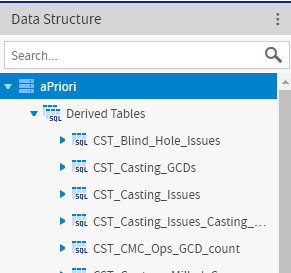
-
Expand the node for the derived table of interest.
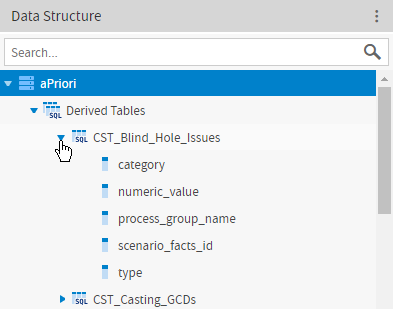 The fields are listed under the name of the tables.
To examine the definition for a derived table:
- Open the aPriori Ad Hoc Data Domain to the Domain Designer. For more information, see To Open the Domain Designer.
-
In the Domain Designer menu bar, click Table Management.
-
On the Table Management tab, in the Data Structure panel, search for, or expand the parent nodes and scroll to the derived table that you want to examine. The parent nodes for the derived tables in the aPriori Ad Hoc Data Domain are aPriori > Derived Tables.
-
Right-click the name of the table, and from the context menu, select Edit Derived Table.
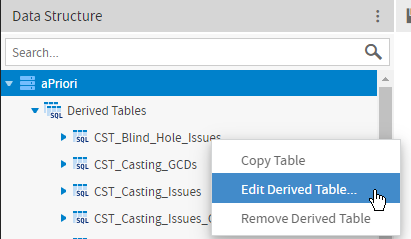 The Edit Derived Table window opens.
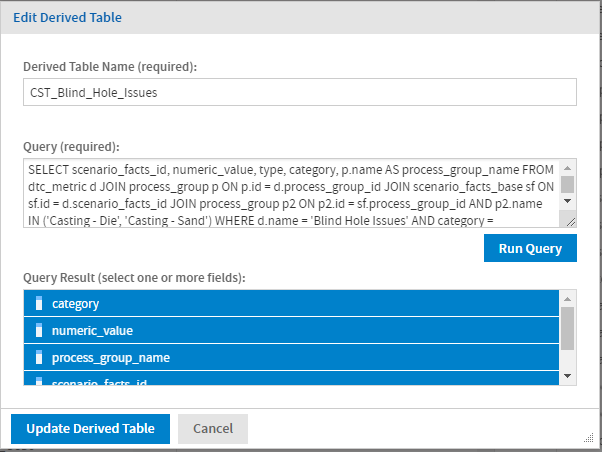 The Edit Derived Table window contains these fields:
- Derived Table Name (required) – Name of the derived table.
- Query (required) – SQL code that defines the derived table and returns the fields in the derived table.
- Query results (select one or more fields) – Fields that are returned by the SQL code that defines the derived table.