Reasons to use this feature
Consider a situation where you have one group in the United States and another group in India, and they need to share aPriori cost data.
It is possible that the group in India is connected to the aPriori server and database in the United States. Or, perhaps they have their own server and database, and they need to regularly import and export scenarios to stay current with their colleagues in the United States.
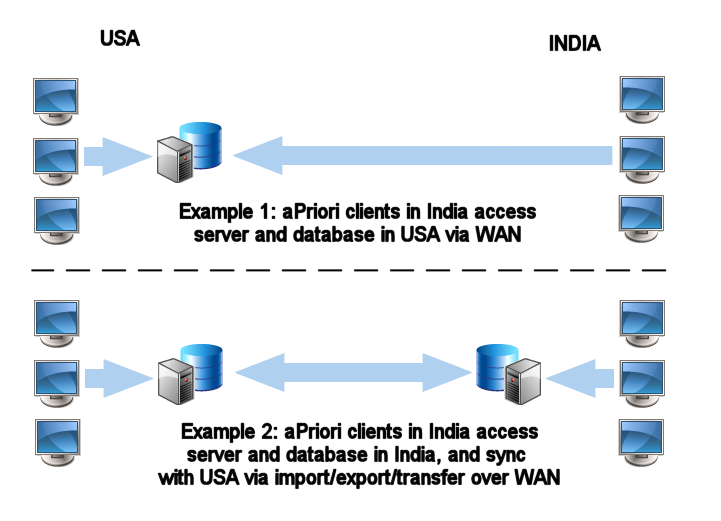
The first example (all clients connect to the same server and database) is more straightforward and keeps everything in sync, but it may not be worthwhile if global networking performance causes unacceptable delays when your users are working. The second example (all clients connect to local servers and databases but sync manually) can improve your users’ day-to-day performance, but the manual process of importing and exporting scenarios and transferring them over the WAN may be an inefficient solution.
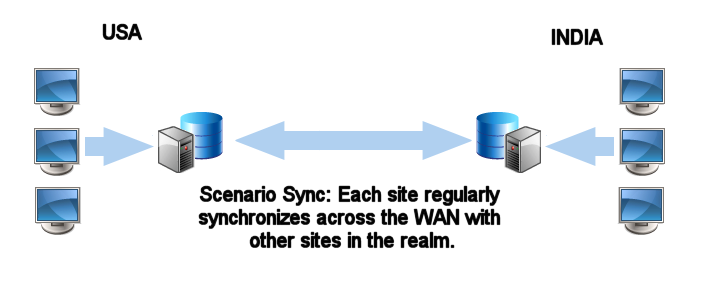
Scenario Sync allows your users to connect to local servers and databases at each of your sites, but the synchronization of scenarios is automated to occur at regular intervals with much less manual intervention.
For the purposes of this discussion, we define site to mean the combination of the server on which aPriori is installed and the database schema it uses. The server is the machine that will run the scenario synchronization scripts for that site. Two or more sites that are synchronizing data constitute a realm.
Note:
All sites within a realm must be running the same versions of aPriori and Scenario Synchronization.
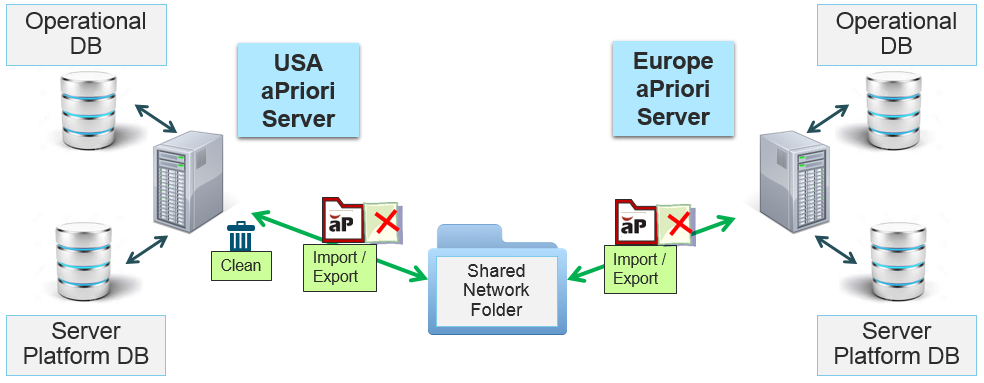
Here is a more detailed example of how Scenario Synchronization might be configured between the USA and Europe: