Structure of the realm repository
The realm repository is a shared file system with two main branches under the common top-level folder:
scenario– This is the branch where the scenario files (in.apexport format) get copied, under a subfolder structure identifying scenario name, timestamp, and site name. For exports, the site name subfolder contains the.apfile that has been exported, and an empty file namedEXPORTEDas a flag to other sites that the scenario is ready to be imported. For imports, the site simply creates an empty file named IMPORTED once the scenario has been successfully imported.site –This branch contains a sub-folder for each site in the realm. The site sub-folders contain log files (named warning.log) and other site metadata. When a site joins the realm, it writes a file named ‘endpoint’ that specifies the HTTPS URL of the site. This allows each site in the realm to send requests to the other sites.
The following illustration shows an expanded realm repository and some of its contents:
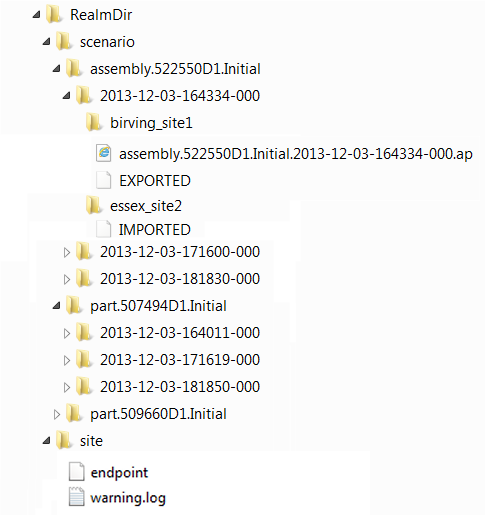
Note that the scenario timestamp folder name is derived from the scenario itself, not from the time that the synchronization process runs. The timestamp is always UTC (not local time zone) and its format is yyyy-MM-dd-HHmmss-SSS, so that it sorts naturally and is human readable.
Here is an example of how the scenario synchronization feature uses the information provided by the realm repository file structure. This realm consists of three sites (Site1, Site2, and Site3) and two components (BASIC_BRACKET and ROCKET_ASSEMBLY).
| Case | Scenario Name | Scenario Timestamp | Site1 Status Flag | Site2 Status Flag | Site3 Status Flag |
|---|---|---|---|---|---|
| 1 | BASIC_BRACKET.Initial | 2013-07-08-080142-123 | EXPORTED | IMPORTED | IMPORTED |
| 2 | BASIC_BRACKET.Initial | 2013-07-10-160042-456 | (none) | EXPORTED | IMPORTED |
| 3 | ROCKET_ASSEMBLY.Initial | 2013-05-05-120133-987 | (none) | (none) | EXPORTED |
| 4 | ROCKET_ASSEMBLY.Initial | 2013-05-10-000102-789 | EXPORTED | EXPORTED | (none) |
Case 1: This indicates a successfully completed synchronization -- Site1 exported the BASIC_BRACKET scenario shortly after 8AM, and the other sites in the realm successfully imported it. The next synchronization operation can perform a clean-up because all sites have imported.
Case 2: Here Site2 created a replacement for Site1's original. It is a replacement because its scenario name is the same and its time stamp is more than two days after case 1. Site3 has already overwritten the scenario, so Site3 is up to date. Site1 is still using the basic bracket from case 1, so Site1 is out of date. This instance cannot be cleaned until Site1 catches up.
Caution:
There is a risk of data loss in this case. If Site1 modifies the original BASIC_BRACKET scenario (from July 8) before synchronizing Site3's change (on July 10), then Site2's change would eventually be lost.
Case 3: Site3 has created the ROCKET_ASSEMBLY, but the other sites have not imported yet. They can do so on their next synchronization pass. Until they do so, this instance cannot be cleaned.
Case 4: This case indicates a problem: two sites have exported exactly the same scenario, perhaps because it was manually exported from Site1 and imported by Site2. This should rarely if ever happen -- millisecond timestamps rarely conflict in the real world. When Site3 finds two exports, Site3 will log a warning and refuse to import either one. Once one of the exports is removed manually, Site3 will be able to import.