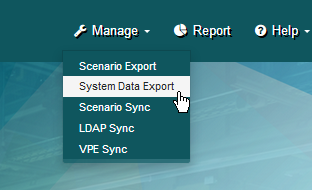
Manage System Data Export
The Manage System Data Export page allows you to administer the export of the following data from the operational database:
- Users and their attributes
- Access Control groups and their attributes (including user/group associations)
-
Currency codes and exchange rates
Note:
You must perform a System Data Export after a new installation or an upgrade; and prior to running OOB reports-- to pick up currency data. For details, see “Important Setup Step for aP Analytics” in either the “Enterprise Platform Installation Guide” or “aP Analytics Guide to OOB Reports”.

To access the Manage System Data Export page
From the Manage pull-down menu click System Data Export.