VPE Sync View History tab
Use this tab to review the status of sync jobs that have run.
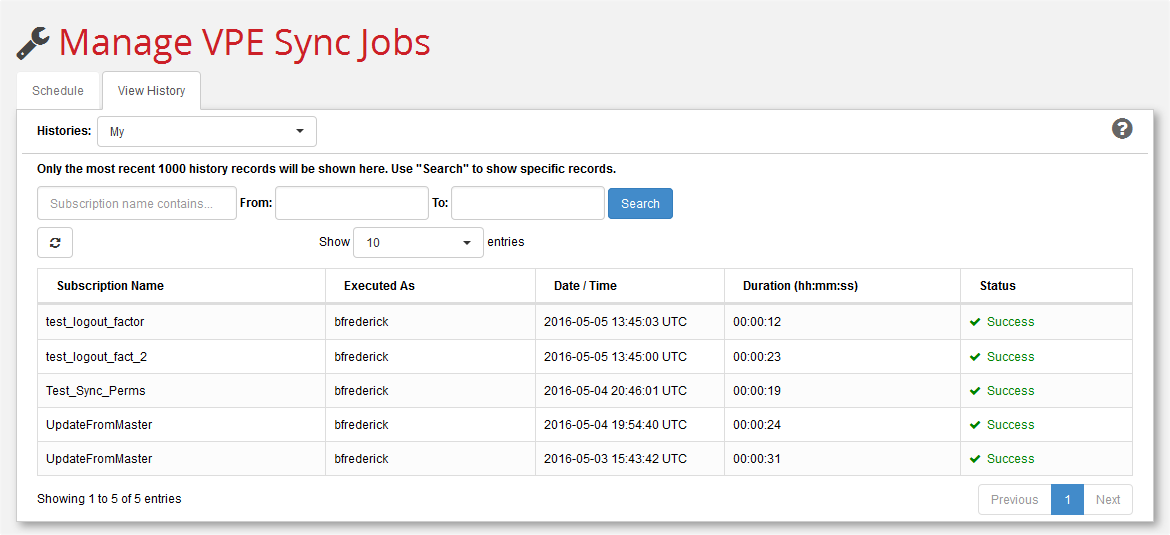
Use the Histories: pull-down menu to filter which sync jobs to display. "My" jobs shows history records associated with your username. "All" is only available to system administrators and shows subscriptions for all users. All sites are queried, and the subscriptions to which you have permission from all sites are presented on the tab as a combined list.
Filter the display by using the calendar widgets in the From and To fields to narrow-down a time period. Enter a string in the Subscription name contains field to display only those jobs that contain the exact same string.
Control the number of jobs displayed with the Show n entries pull-down menu.
Note:
You can display additional information about status by hovering your cursor over entries in the Status: column. When there is a failure, you can also click the link in the status column to open a dialog with more detailed failure messages.
Use the Refresh button to update the list of scheduled jobs.
Note:
Recently executed jobs do not appear here until you click the Refresh button.