Release Notes
Enterprise Platform Release Notes provide information about new features, enhancements, and resolved issues in aP Admin and aP Analytics. If you encounter any issues, please review the Troubleshooting section in the aPriori Support knowledge base.
April, 2026 (Version 2026 R1)
Server Platform Hotfix 26.1.0.1
This hot fix addresses an intermittent issue in which exports from the aPriori operational database to the reporting database did not successfully complete.
Customers using aPriori’s Cloud solution will be upgraded automatically. Customers using the aP Pro on-premise solution are advised to upgrade to this hot fix version rather than the initial 2026 R1 release.
June, 2025 (Version 2025 R1 SP1)
There are no new capabilities or resolved issues introduced in Enterprise Platform 2025 R1 SP1.
This release is compatible with aP Pro 2025 R1 SP1.
March, 2025 (Version 2025 R1)
There are no new capabilities or resolved issues introduced in Enterprise Platform 2025 R1.
This release is compatible with aP Pro 2025 R1.
Dec 11, 2024 (Version 2024 R1 SP3)
There are no new capabilities or resolved issues introduced in Enterprise Platform 2024 R1 SP3.
This release is compatible with aP Pro 2024 R1 SP3.
Sep 12, 2024 (Version 2024 R1 SP2)
There are no new capabilities or resolved issues introduced in Enterprise Platform 2024 R1 SP2.
This release is compatible with aP Pro 2024 R1 SP2.
Jun 14, 2024 (Version 2024 R1 SP1)
New Features
This release provides the following enhancement.
Upgraded Version of JasperReports
For security and feature enhancements, aP Analytics now uses JasperReports Server version 8.2.0. This version includes multiple security enhancements and bug fixes. Most notably, a user now can export a dashboard to all supported file formats (CSV, DOCX, Excel, ODT, ODS, PDF, PNG, PPTX, RTC, XLSX). Previously an issue prevented export to PDF, PNG, PPTX, and XLS formats.
Mar 8, 2024 (Version 2024 R1)
There are no new capabilities or resolved issues introduced in Enterprise Platform 2024 R1.
This release is compatible with aP Pro 2024 R1.
Nov 8, 2023 (Version 2023 R1 SP3)
There are no new capabilities or resolved issues introduced in Enterprise Platform 2023 R1 SP3.
This release is compatible with aP Pro 2023 R1 SP3.
Sep 13, 2023 (Version 2023 R1 SP2)
New Features
Enterprise Platform 2023 R1 SP2 includes product name changes, support for Windows 11, and an enhancement for aPriori Admin.
Info
Some features may be part of separately licensed modules and may not be included in all deployments. Please direct questions to your aPriori Account Representative or to aPriori Customer Support.
Enterprise Platform – Support for Windows 11
Enterprise Platform, including both aP Admin and aP Analytics, has been certified for use with Microsoft® Windows 11.
Enterprise Platform – Updated Names and User Interfaces for aPriori Products
aPriori products were rebranded to reflect a broad focus that includes sustainability and manufacturability insights in addition to cost estimates.
This table includes the new and old names for the rebranded products, solutions, and modules. It also indicates the release in which the relevant user interface (UI) will be updated to reflect the name changes.
| Old Name | New Name | UI Update Release |
|---|---|---|
| Cost Insight Generate | aP Generate | 2023 R1 Version 3.1.0 |
| Cost Insight Connect | aP Connect | 2023 R1 Version 3.1.0 |
| Cost Insight Design | aP Design | 1.7.0 |
| Cost Insight Admin | aP Admin | 2023 R1 SP2 |
| Cost Insight Report | aP Analytics | 2023 R1 SP2 |
| aPriori Professional | aP Pro | 2023 R1 SP2 |
Limitations
In some cases the UI may still use the old branding but will be updated shortly.
aP Admin – Faster Cleanup of Stalled Scenario Export Jobs
On occasion, a scenario export job fails to complete due to a server configuration issue. If a scenario export job fails to complete, it is now marked as Aborted in the View History tab in aP Admin and can be purged.
If an export job fails to process any scenarios for a configurable time period (48 hours by default), the status of the job moves from Started or In Progress to Aborted. If an export job has Aborted status, a user can purge the job via the Purge tab in aP Admin.
This feature provides increased visibility into which export jobs are active versus stalled. It also allows helps free up computational resources for handling new export jobs by providing a quick, self-service cleanup method for stalled export jobs.
Compatibility
aPriori Cloud products are compatible only with other Cloud products. You cannot, for example, use a Cloud installation of aP Admin to export data from an On-Premise installation of aPriori Professional and use it with a Cloud version of aP Analytics.
aPriori On-Premise products are compatible only with other On-Premise products. For example, if you have an On-Premise installation of aPriori Professional, you cannot use it with Cloud versions of aP Admin or aP Analytics.
Within these environment constraints, 2023 R1 SP2 versions, of aP Analytics and aP Admin (or their Hot Fix updates) are compatible only with aPriori Professional 2023 R1 SP2 (or its Hot Fix updates). They are not compatible with any prior release of aPriori Professional.
Jun 14, 2023 (Version 2023 R1 SP1)
New Features
Enterprise Platform 2023 R1 SP1 provides aPriori 2023 R1 SP1 includes several Cost Insight Admin enhancements that improve the speed and robustness of scenario exports from the aPriori Operational database to the aPriori Reporting database and provides better tools for managing scenario export jobs and reporting data.
Info
Some features may be part of separately licensed modules and may not be included in all deployments. Please direct questions to your aPriori Account Representative or to aPriori Customer Support.
Comprehensive synchronization for All Delta exports
The All Delta scenario export now syncs all changes to scenarios, including deletions, between the Operational and Reporting database since the last successful All or All Delta export job. The All Delta is also less likely to run into memory-related failure because its synchronization of all changed or recosted scenarios is faster and less computationally expensive than the All export job.
If you typically report on all scenario data and have an All export job that takes hours to complete, you can reduce your reliance on the All export by running it only on the timeline of your All Delta purge schedule . For example, you could run one All export job to initialize the reporting database and subsequently run All Delta export jobs daily. To purge All Delta data older than three months on a monthly basis while ensuring that all untouched scenarios persist in the reporting database, run the All export once a month.
Description field and wildcard-based queries for the New Purge Schedule dialog
As the size of your Reporting database increases, Cost Insight Report (also known as aP Analytics) can experience a decrease in performance. Although you can decrease the size of your Reporting database, and therefore improve performance, by using a Cost Insight Admin (also known as aP Admin) Purge job, prior releases did not provide an easy method for purging old Cost Insight Generate (also known as aP Generate) scenario data from your Reporting database.
Now, when you create a New Purge Schedule in Cost Insight Admin, you can bulk select Cost Insight Generate export jobs by specifying the wildcard symbol, *, for the Set Name field and entering an applicable value in the new Description field, which also accepts wildcards.
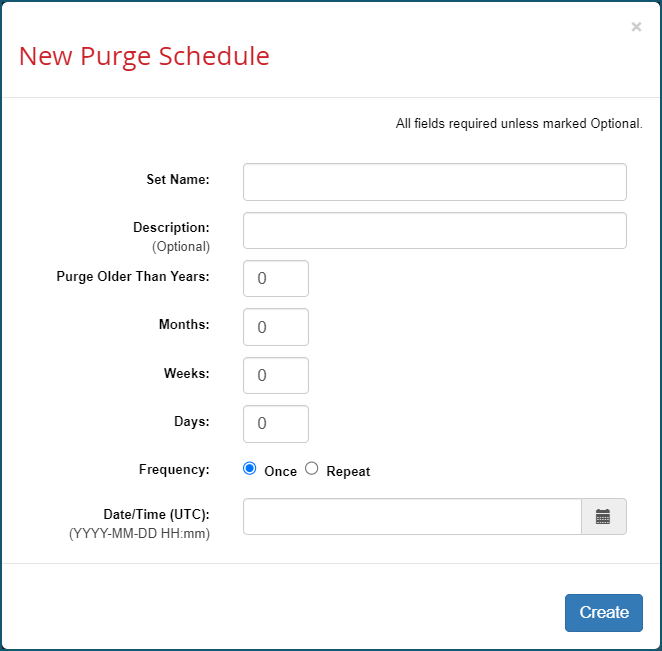
For example, to create a New Purge Schedule on all export jobs triggered by Cost Insight Connect (also known as aP Connect) specify these values in Cost Insight Admin:
- Set Name:
* -
Description:
CI Connect triggered export setNote:
If you experience poor performance in Cost Insight Report, as a best practice, purge your reporting database of all non-essential historical data.
Compatibility
aPriori Cloud products are compatible only with other Cloud products. You cannot, for example, use a Cloud installation of Cost Insight Admin to export data from an On-Premise installation of aPriori Professional and use it with a Cloud version of Cost Insight Report.
aPriori On-Premise products are compatible only with other On-Premise products. For example, if you have an On-Premise installation of aPriori Professional, you cannot use it with Cloud versions of Cost Insight Admin or Cost Insight Report.
Within these environment constraints, 2023 R1 SP1 versions, of Cost Insight Report and Cost Insight Admin (or their Hot Fix updates) are compatible only with aPriori Professional 2023 R1 SP1 (or its Hot Fix updates). They are not compatible with any prior release of aPriori Professional.
Mar 1, 2023 (Version 2023 R1)
New Features
Enterprise Platform 2023 R1 provides support for an additional version of MySQL. Cost Insight Report provides performance and security fixes (via a JasperServer upgrade), and support for Ad Hoc reporting on Carbon data.
Info
Some features may be part of separately licensed modules and may not be included in all deployments. Please direct questions to your aPriori Account Representative or to aPriori Customer Support.
Enterprise Platform – Support for MySQL 8.0
After thorough testing, the Enterprise Platform, including both Cost Insight Admin and Cost Insight Report, has been approved for use with a MySQL 8 database.
Enterprise Platform – Pending De-Support for MySQL 5.7
MySQL 5.7 reached end of life in October 2023. aPriori supports MySQL 5.7 in release 2023 R1 and in 2023 R1 service packs and hotfixes but will not test or certify the use of MySQL 5.7 in any other future major releases. Customers are advised to upgrade to a newer version of MySQL or to another supported database.
For information on supported database versions, see the 2023 R1 aPriori On-Premise System Requirements.
Cost Insight Report – JasperReports Server 8.1.1 Upgrade
Cost Insight Report now uses JasperReports Server version 8.1.1. This version patches multiple security vulnerabilities in JasperReports Server 7.9, most notably CVE-2022-42889 (commons-text vulnerability) and CVE-2022-22965 (Spring4Shell vulnerability).
Note:
This upgrade does not introduce any notable changes to the functionality of Cost Insight Report.
Cost Insight Report – Ad Hoc Reporting Support for Sustainability Data
Cost Insight Report includes new Sustainability Measures for custom reporting on carbon emissions at the rollup, scenario, and process levels. With sustainability reporting you can create charts that display carbon alongside cost and manufacturability, highlight carbon outliers, and track changes in carbon emissions over time.
These new measures are available in the Ad Hoc Reporting tool, in the aPriori Ad Hoc Data domain, under Measures > Process Facts > Sustainability:
- Process Material Carbon Factor (kg C02e/kg material)
- Process Material Carbon (kg C02e)
- Process Carbon (kg C02e)
- Process Energy Carbon Factor (kg C02e/kWh)
- Process Logistics Carbon (kg C02e)
- Process Total Carbon (kg C02e)
These new measures are available in the Ad Hoc Reporting tool, in the aPriori Ad Hoc Data Domain, under Measures > Scenario Facts > Sustainability:
- Scenario Aggregate Material Carbon (kgC02e)
- Scenario Aggregate Process Carbon (kg C02e)
- Scenario Aggregate Logistics Carbon (kg C02e)
- Scenario Aggregate Total Carbon (kgC02e)
- Scenario Material Carbon (kg C02e)
- Scenario Process Carbon (kg C02e)
- Scenario Logistics Carbon (kg C02e)
- Scenario Total Carbon (kg C02e)
- Scenario Batch Carbon (kg C02e)
- Scenario Annual Carbon (kg C02e)
- Scenario Lifetime Carbon (kg C02e)
Limitation
The Sustainability measure values are 0 if either:
- Your organization does not have a license for the aP Pro Sustainability module.
- Your organization does have a license for the aP Pro Sustainability module, but the component has not been costed either:
- In a version of aP Pro that supports Sustainability.
- Using a process group and process that is supported for Sustainability.
Resolved Issues
These issues, which were discovered in prior releases, are resolved in Enterprise Platform, including Cost Insight Admin and Cost Insight Report, 2023 R1:
Cost Insight Admin – (SQL Server and Oracle Only) Error in login activity recorder prevents Cost Insight Admin user login after multiple unsuccessful attempts
This issue has been resolved and the provided workaround is no longer necessary.
In aPriori Enterprise Platform release versions 2022 R1 and later, if a user unsuccessfully attempts to log in two or more times to Cost Insight Admin when using a SQL Server or Oracle database, then:
- The user will not be able to log in to Cost Insight Admin with the correct credentials.
- A large Catalina log will be produced.
Workaround
After a second failed login attempt into Cost Insight Admin, the user should restart the Tomcat server to restore their ability to login to Cost Insight Admin with the correct credentials and to stop the production of a large Catalina log.
Cost Insight Report – Jasper database migration fails due to JasperReports Server bug
This issue has been resolved and the provided workaround is no longer necessary.
Due to a JasperReports Server bug in which the target Jasper database does not accept migrated passwords of a necessary length, Jasper database migration from a 2021 R1 version of aPriori to a 2022 R1 version of aPriori fails.
Workaround (On Premise Only)
aPriori recommends that On-Premise Cost Insight Report customers skip Jasper database migration when moving from any aPriori2021 R1 version (21.1.X.Y) to aPriori2022 R1 because Cost Insight Report On-Premise migration occurs in place and there are no schema changes between the Jasper 7.9 version used in aPriori 2021 R1 and the Jasper 7.9 Hotfix version that is used in aPriori2022 R1.
Known Issues and Workarounds
This release contains unresolved issues from prior versions of Enterprise Platform, including Cost Insight Admin and Cost Insight Report, (as described in the release notes for the version in which they were identified) and this newly identified issue for On-Premise user of Cost Insight Admin.
VPE Sync Failure due to Missing Resource (On Premise only)
In aPriori On Premise deployments, for releases 2022 R1 SP1 and later, the VPE sync process fails due to a missing resource error.
Workaround
To enable VPE Sync:
-
Create this folder structure within the apriori-platform installation folder:
apriori-platform\aserver\conf\ssl -
Copy the "
cacerts" file from theapriori-platform\tomcat\conf\ssldirectory to this directory:C:\apriori-platform\aserver\conf\ssl -
Restart the aServers.
Compatibility
aPriori Cloud products are compatible only with other Cloud products. You cannot, for example, use a Cloud installation of Cost Insight Admin to export data from an On-Premise installation of aPriori Professional and use it with a Cloud version of Cost Insight Report.
aPriori On-Premise products are compatible only with other On-Premise products. For example, if you have an On-Premise installation of aPriori Professional, you cannot use it with Cloud versions of Cost Insight Admin or Cost Insight Report.
Within these environment constraints, 2023 R1 versions, of Cost Insight Report and Cost Insight Admin (or their Hot Fix updates) are compatible only with aPriori Professional 2023 R1 (or its Hot Fix updates). They are not compatible with any prior release of aPriori Professional.
Oct 21, 2022 (Version 2022 R1 SP1)
Known Issues and Workarounds
This release contains unresolved issues from prior versions of Cost Insight Admin and Cost Insight Report (as described in the release notes for the version in which they were identified) and this newly identified issue:
(SQL Server and Oracle Only) Error in login activity recorder prevents Cost Insight Admin user login after multiple unsuccessful attempts
In aPriori Enterprise Platform release versions 2022 R1 and later, if a user unsuccessfully attempts to log in two or more times to Cost Insight Admin when using a SQL Server or Oracle database, then:
- The user will not be able to log in to Cost Insight Admin with the correct credentials.
- A large Catalina log will be produced.
Workaround
After a second failed login attempt into Cost Insight Admin, the user should restart the Tomcat server to restore their ability to login to Cost Insight Admin with the correct credentials and to stop the production of a large Catalina log.
Compatibility
aPriori Cloud products are compatible only with other Cloud products. You cannot, for example, use a Cloud installation of Cost Insight Admin to export data from an On-Premise installation of aPriori Professional and use it with a Cloud version of Cost Insight Report.
aPriori On-Premise products are compatible only with other On-Premise products. For example, if you have an On-Premise installation of aPriori Professional, you cannot use it with Cloud versions of Cost Insight Admin or Cost Insight Report.
Within these environment constraints, 2022 R1 SP1 versions, of Cost Insight Report and Cost Insight Admin (or their Hot Fix updates) are compatible only with aPriori Professional 2022 R1 SP1 (or its Hot Fix updates). They are not compatible with any prior release of aPriori Professional.
Jun 28, 2022 (Version 2022 R1)
New Features
Info
Some features may be part of separately licensed modules and may not be included in all deployments. Please direct questions to your aPriori Account Representative or to aPriori Customer Support.
Enterprise Platform – Setting the Highest Cost Metric for Automated Cost Avoidance
A non-empty Highest Cost Metric value must be set for the Reporting database to begin tracking each component’s Highest Cost Scenario, used in Automated Cost Avoidance calculation.
The Installation Setup Wizard provides an opportunity for you to set a Highest Cost Metric value, choosing between Fully Burdened Cost, Piece Part Cost, Total Variable Cost, and None. None corresponds with an empty value set for the Highest Cost Metric property in the Reporting database and will defer enablement of Highest Cost Scenario tracking and Automated Cost Avoidance reporting. Once a value other than None is set for the Highest Cost Metric, the metric value cannot be changed. If you’d prefer to set the Highest Cost Metric after installation, that is also an option.
To learn how to set the Highest Cost Metrics for an On-Premise deployment, see the Cost Insight Report & Cost Insight Admin On-Premise Installation Guide.
Cost Insight Report – Automated Cost Avoidance Report
Cost Insight Report now includes the Automated Cost Avoidance report, a new Out-of-Box (OOB) value tracking report for design engineers. This report eliminates the need for manual selection of scenarios for Cost Avoidance calculation by automatically calculating Cost Avoidance as the cost difference between a Highest Cost and Latest Cost Scenario for each component. Please see the Cost Insight Report Out of the Box Report guide more information on how to use the Automated Cost Avoidance report.
Cost Insight Report – Automated Cost Avoidance Field and Measures
In the Ad Hoc reporting tool, the Reporting Data domain now includes new Cost Avoidance relevant columns to support easy access to Cost Avoidance data when creating an Ad Hoc report. The new field Scenario Highest Facts ID is a unique identifier for a component’s Highest Cost Scenario facts record. The new measure Scenario Highest Cost is the cost value, using the highest cost metric, of the component’s Highest Cost Scenario. The new measure Scenario Cost Avoidance is the cost difference between the Highest Cost Scenario and the currently selected scenario facts record. The new measure Scenario Annualized Cost Avoidance is the Scenario Cost Avoidance multiplied by the annual volume of the currently selected scenario facts record. Please see the Cost Insight Report User Guide for more information on Automated Cost Avoidance in the Ad Hoc reporting tool.
Cost Insight Report – Enhancements to All Activity Derived Table
In the Ad Hoc reporting tool, the Operational Domain was designed to allow you report on one user activity at a time. The Operational Domain includes an ‘All Activity’ derived table that allows you to report on multiple types of user activity in a single Ad Hoc report. The derived table now includes Logout as an Activity Type and includes an Activity Source field for distinguishing which application the activity was initiated from. See the Cost Insight Report User Guide for more information on Activity Reporting.
Cost Insight Report – Jasper Upgrade to Support Log4j Patch
Cost Insight Report now uses Jasper 7.9 Hotfix, a version that supports Log4j 2.17.1, a recent version of the logging software that patches a security vulnerability. This upgrade does not introduce any notable changes to Cost Insight Report product function.
Cost Insight Admin – Automatic Tracking of Highest Cost Scenario
As part of the Automated Cost Avoidance solution, an administrator can enable the reporting database to automatically track the Highest Cost Scenario for each exported component by setting a non-empty value for the Highest Cost Metric configuration property. Highest Cost Scenario is used to calculate Cost Avoidance in both the Automated Cost Avoidance OOB report and Ad Hoc reporting tool. Please see the Cost Insight Report Out of the Box Guide for more instruction on setting a Highest Cost Metric and for more information on Automated Cost Avoidance reporting.
Resolved Issues
These issues have been resolved by this release of Cost Insight Report:
LastPass password manager prevents browsers from exporting Cost Insight Reports
The LastPass password manager prevents all browsers from exporting any Cost Insight Report to any file extension.
When you attempt to export a report, the browser opens a new tab for the Cost Insight Report log-in page. If you log in, the new tab opens to the Cost Insight Report home page. This issue is caused by a LastPass script that is appended to the page and executed on an export form submission.
Workaround
Firefox – Start Firefox in Safe Mode https://support.mozilla.org/en-US/kb/troubleshoot-firefox-issues-using-safe-mode
Chrome – Open Chrome in Incognito mode https://support.google.com/chrome/answer/95464?co=GENIE.Platform%3DDesktop&hl=en
Some CIR OOB Reports Unavailable
Digital Factory Performance and Digital Factory Performance Details Cost Insight Report out of the box (OOB) reports unavailable due to JasperReports Server bug
Due to a JasperReports Server bug, if you launch a VPE Performance or a VPE Performance Details out of the box report while using the Oracle database type, Cost Insight Report generates this error:
- There was an error on the server. Try again or contact site administrators. Due to this error, the VPE Performance and VPE Performance Details reports are temporarily unavailable while the Oracle database type is in use.
Selected Material for Assembly Molding and Assembly Plastic Molding Process Group Not Exported
For the Assembly Molding process and the Assembly Plastic Molding process, Cost Insight Admin scenario export does not export the material that is selected for the scenario.
Therefore, the selected material is not included in the Cost Insight Report Database.
For help resolving this issue, contact aPriori Support.
Known Issues and Workarounds
This release contains unresolved issues from prior versions of Cost Insight Admin and Cost Insight Report (as described in the release notes for the version in which they were identified) and these newly identified issues:
Gaps in Cost Insight Design activity tracking
Due to recent Cost Insight Design architectural changes, the following activities in Cost Insight Design will not be recorded in the Operational Database Activity Tables and therefore will not be reflected in Cost Insight Report’s Operational Data domain:
-
Login Activity
-
Open Activity
-
Comparison Activity
DTC Part Summary OOB report is no longer able to link to Cost Insight Design
Due to recent Cost Insight Design architectural changes, Cost Insight Reports are no longer able to link to Cost Insight Design. This limitation only affects the DTC Part Summary OOB report. It does not affect the Cost Insight Generate DTC Part Summary workflow report.
aPriori Professional inactivity logout occurs while automatic time out feature is disabled
If userSessionInactivityTimeoutInMinutes is changed from a non-zero integer to 0 and saved, the new value does not take effect until after the user closes and then reopens the aPriori Professional application.
Workaround
To implement the value change after setting the userSessionInactivityTimeoutInMinutes system variable to 0, the user must close and then reopen aPriori Professional
Info
If the userSessionInactivityTimeoutInMinutes is set to 0, the inactivity logout is disabled.
Modifications to system variable values take effect after the user logs out and then logs back in to aPriori Professional application.
An issue with Chrome prevents the download of exported PDFs
Due to a problem with the Chrome browser, attempts to download exported PDF reports result in the error: “Failed - Network error”
Workaround
-
Use a different browser.
-
Use Print and Save as > PDF.
-
Use Google’s recommended workaround: https://support.google.com/chrome/answer/6213030?hl=en-GB
Export set multi-select list scroll position reset
Due to a JasperReports Server bug, the Export Set dropdown list in the Input Controls window for certain OOB reports resets when you select an export set from the list.
Jasper database migration fails due to JasperReports® Server Server bug
Due to a JasperReports Server bug in which the target Jasper database does not accept migrated passwords of a necessary length, Jasper database migration from a 2021 R1 version of aPriori to a 2022 R1 version of aPriori fails.
Workaround (On Premise Only)
aPriori recommends that On-Premise Cost Insight Report customers skip Jasper database migration when moving from any aPriori 2021 R1 version (21.1.X.Y) to aPriori 2022 R1 because Cost Insight Report On-Premise migration occurs in place and there are no schema changes between the Jasper 7.9 version used in aPriori 2021 R1 and the Jasper 7.9 Hotfix version that is used in aPriori 2022 R1.
Issue with sorting and filtering on Activity Time field in Operational Data Domain
Due to an issue in the All Activity derived table, which you can access by selecting the Operational Ad Hoc Data Domain and the All Activity data source in the Cost Insight Report Ad Hoc reporting tool, when you attempt to sort on the Activity Time field some rows do not sort properly and when you attempt to filter on the Activity Time field you can only filter on a single timestamp.
Workaround
Please contact aPriori Support to receive a new Operational Data Domain that includes a fix to this issue.
Compatibility
aPriori Cloud products are compatible only with other Cloud products. You cannot, for example, use a Cloud installation of Cost Insight Admin to export data from an On-Premise installation of aPriori Professional and use it with a Cloud version of Cost Insight Report.
aPriori On-Premise products are compatible only with other On-Premise products. For example, if you have an On-Premise installation of aPriori Professional, you cannot use it with Cloud versions of Cost Insight Admin or Cost Insight Report.
Within these environment constraints, 2022 R1 versions, of Cost Insight Report and Cost Insight Admin (or their Hot Fix updates) are compatible only with aPriori Professional 2022 R1(or its Hot Fix updates). They are not compatible with any prior release of aPriori Professional. The most up-to-date compatibility information is always available in the current System Requirements document on the aPriori Support Help Center.