AppStream Directories
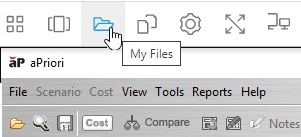
The Home Folder and Temporary Files directories are your dedicated personal directories on the AppStream server. To access either directory, from the AppStream toolbar, click My Files.
The Temporary Files directory is the preferred directory for importing CAD files. Files in the Temporary Files folder are deleted at the end of an AppStream session, but once a CAD file is first analyzed, it persists in a cloud storage container and its associated scenarios remain CAD-connected.
Only use the Home Folder directory if you need the CAD file to persist across AppStream sessions until you explicitly delete it. This persistence relies on automatic background synchronization whose high computational cost can slow performance significantly during analysis.
From your Temporary Files directory, you can do the following:
- Upload files. You can drag and drop CAD files to upload them from your local file system to your Temporary Files Folder. For more information, see Uploading Files.
- Navigate to the workspace in a file chooser. When you open a CAD file, you can navigate to your Temporary Files Folder by clicking This PC in the navigation pane. For more information, see Uploading Files.
- Download files. You can download files, such as aPriori-generated reports, from your Temporary Files Folder to your local machine. For more information, see Download Files.
- Manage folders and files. You can create, rename, or delete folders that are in your Temporary Files Folder. For more information, see Renaming Folders and Files and Deleting Folders and Files