Manage Licenses
System Administrators (users with System Admin enabled - see Adding users) can view and manage information for user and module licenses currently active in your aPriori installation.
Note:
To renew or expand your licenses, contact your aPriori Account Executive.
Licensed Modules
Licensed modules include:
- Regional Data Libraries.
-
Manufacturing Cost Models, such as Plastics Molding.
Note:
Users can only calculate costs for the process groups for which they are licensed. For example, a Sheet Metal license module is required to cost any sheet metal component
-
Functional modules, such as Bulking Costing & Analysis.
Info:
See License Types for more details.
Your installation may have multiple license files - see Load a License for more details.
License Checking
License information is stored in the aPriori database; aPriori checks this information to verify that the user has the correct license for access.
aPriori validates the license:
- At login, aPriori checks that the user is associated with a valid user license.
- When costing, the application checks that the user is licensed for that particular module.
View Basic License Information
Go to Help > View License... to see the current license's expiration date, licensed processes, CAD cost connectors, and other features:
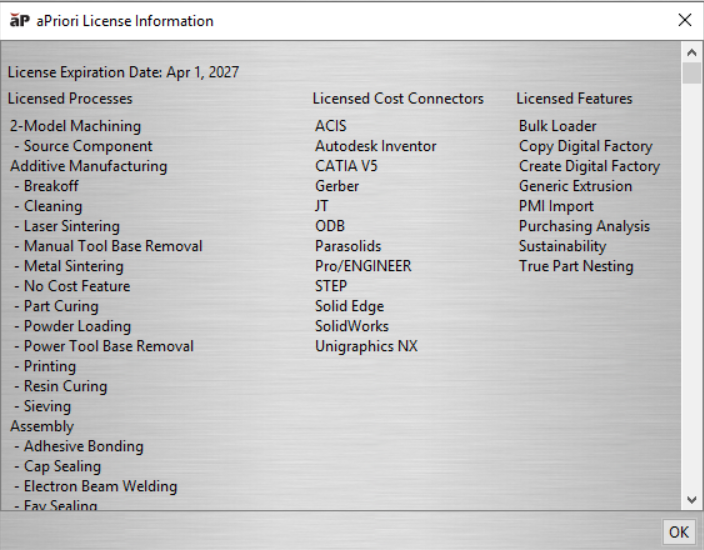
To view more detailed license information, see View Detailed License Information.