Review the Carbon Summary for a part
This example shows how to view a summary of the carbon data for a part.
Procedure
- Open a costed scenario for the part.
-
Open the Sustainability tab.
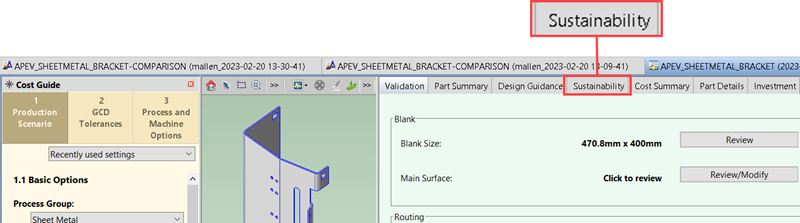
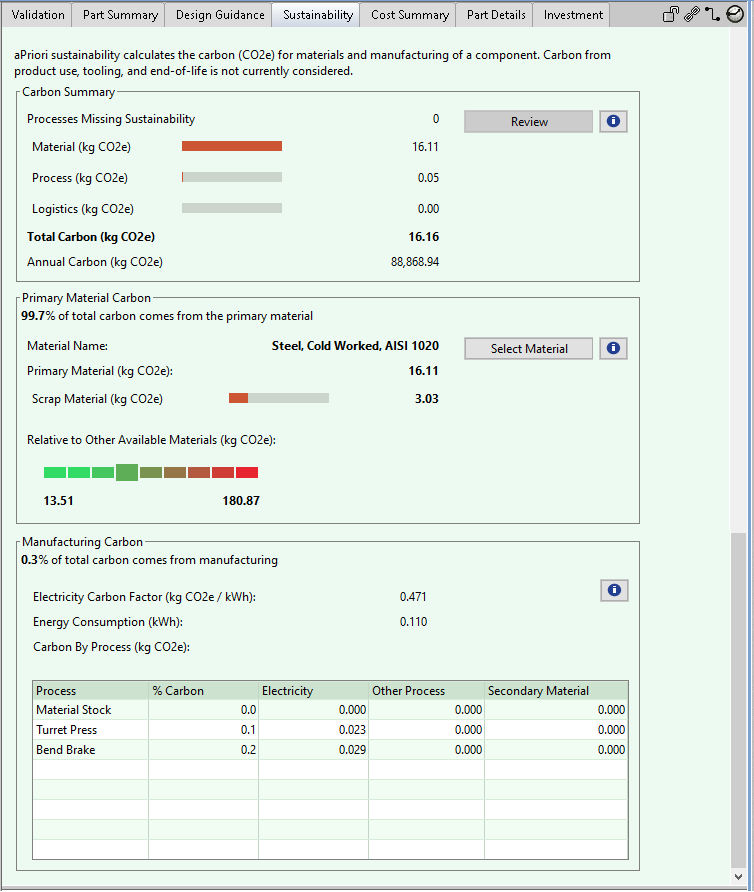
The Sustainability tab has these sections:
-
Carbon Summary
-
Primary Material Carbon
-
Manufacturing Carbon
Info:
The units that are displayed in the field names depend on your Unit System Settings. In this example, the mass is displayed in kilograms (kg).
Tip:
You can extract and download the data as an Excel file. For more information, see Sustainability spreadsheet reports.
This example focuses on the information in the Carbon Summary. For more information about Primary Material Carbon and Manufacturing Carbon data, see View Sustainability Results.
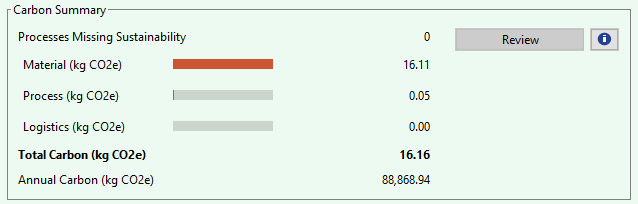
For the part in this example, the Carbon Summary shows that:
-
No processes are missing sustainability data. For more information, see Processes Missing Carbon Data.
-
The Material (kg CO2e or lb CO2e) is 16.11. For more information, see Material Carbon.
-
The Process (kg CO2e or lb CO2e) is 0.05. For more information, see Process Carbon.
-
The Logistics (kg CO2e or lb CO2e) is 0.00. For more information, see Logistics Carbon.
-
The Total Carbon (kg CO2e or lb CO2e) is 16.16. For more information, see Total Carbon.
-
The Annual Carbon (kg CO2e or lb CO2e) is 88,868.94. For more information, see Annual Carbon.
-
Processes Missing Carbon Data
This field indicates the number of processes that are missing sustainability data, that is the number of processes in the selected routing path that are not supported for sustainability or for which the carbon data was not otherwise calculated. When no processes are missing sustainability data, the Review button that is next to the field is disabled.
When one or more processes is missing sustainability data, the sustainability results shown are incomplete and the Review button that is next to the field is enabled. In this case, the manufacturing carbon may be higher than the displayed calculated value.
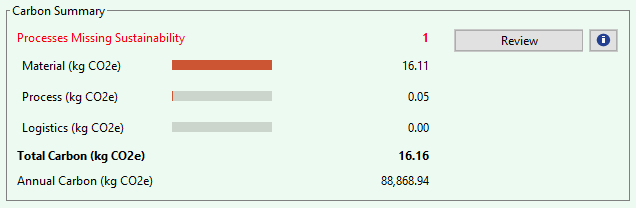
To determine which processes are missing sustainability data, click the Review button.
The Process Missing Sustainability dialog opens and displays any processes that do not calculate carbon, and, if applicable, any processes which have carbon partially calculated.
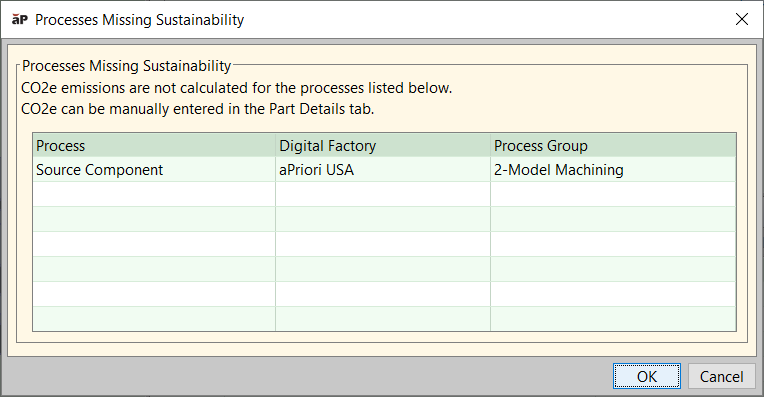
You can see the following details:
- Processes Missing Sustainability – Processes in the table do not calculate sustainability data. Although aPriori Sustainability has no carbon data for the materials and processes used, carbon data can be manually entered in the Part Details tab.
- Processes with Partial Sustainability (if applicable) – Processes in the table have sustainability data partially calculated. aPriori Sustainability has carbon data for some of the materials and processes used. This means that the routing includes a mix of supported and unsupported processes. Details are in the text window below the table. If there are no processes with partial sustainability, the Processes Missing Sustainability dialog does not include this section.
Tip:
You can manually add (or edit) carbon data for processes that are not yet supported. For a related example, see Edit Sustainability data in the Part Details tab.
Note:
The processes included in the initial releases are the most commonly used processes. Some processes do not yet have sustainability data. Future aPriori releases will apply sustainability data to more processes. See Processes supported in Sustainability.
Material Carbon
Material Carbon is the mass of the CO2 equivalent that is attributed to the raw materials of the part, that is, the carbon associated with the primary material rough mass and secondary materials (for example, paint) consumed during the manufacturing of the part.
Info:
To determine Material Carbon, aP Pro uses energy consumption factors from the Ecoinvent IPCC 2021 GWP dataset. The source for energy consumption factors may vary for configured environments.
Tip:
You can review and edit the Primary Material Carbon Factor, which aP Pro uses to calculate Material Carbon, in the Formula Dependencies dialog or by using the Digital Factory Manager.
Process Carbon
Process Carbon is the mass of the CO2 equivalent that is attributed to the processes used to manufacture a part. Process Carbon includes the electricity and other energy sources that are required to turn the rough mass into the finished component.
Info:
To determine Process Carbon, aP Pro uses energy consumption factors from the Ecoinvent IPCC 2021 GWP dataset. The source for energy consumption factors may vary for configured environments.
Tip:
You can review and edit the Energy Carbon Factor, which aP Pro uses to calculate Process Carbon, in the Formula Dependencies dialog or by using the Digital Factory Manager.
Electricity Process Carbon
Electricity Process Carbon is the carbon that is attributable to the electricity that is used to manufacture a part. It is typically the primary source of process carbon.
Other Process Carbon
Other Process Carbon is any source of process carbon, including additional sources of carbon, that are not related to electricity, such as the natural gas used in furnaces.
Logistics Carbon
Logistics Carbon is the carbon consumed during the transportation and transportation-related storage of the materials and supplies that are required to manufacture a part.
Logistics Carbon is not currently calculated in default aPriori cost models, but you can manually enter logistics carbon data via the part details tab. For more information, see Edit the Logistics Carbon for a part.
Total Carbon
Total Carbon is the total carbon emission for a single part, which is the mathematical sum of material, process, and logistics carbons for the part.
Annual Carbon
The total carbon consumed from a volume of parts that a facility manufactures in one year. Mathematically, the Annual Carbon is the total carbon multiplied by annual volume.