Wire Harness Costing Workflow
Costing Requirements
To cost a Wire Harness, aP Pro requires these inputs:
- A Bill of Materials (BOM) file that contains component information created by a supported Wire Harness design tool. aP Pro can convert this format into a standardized spreadsheet in CSV format. See Wire Harness BOM Formatting.
- A component type identifier for each part number, such as "Termination", "Wire", or "Connector". See Wire Harness Processes.
- Standard prices for off-the-shelf components such as wires and braids. The standard prices are stored in a Component Library that maps the prices to both Customer Part Numbers and Manufacturer Part Numbers. See Compiling Component Library data.
Overview
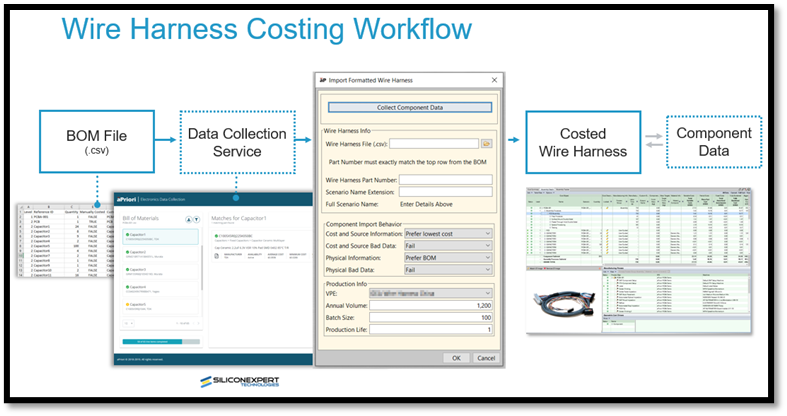
The Wire Harness workflow is:
- Format the Wire Harness BOM: ensuring that it has all the necessary information to allow aPriori to extract it. See Wire Harness BOM Formatting.
-
Choose data sources: select one or more of the following:
-
Use only information in the BOM. aP Pro extracts cost driver information as CSV files that can be read by the aPriori BOM loader for the Wire Harness process group. See BOM Loader.
-
Use an existing in-house library that contains all the current rates you normally apply, replicating this library in aP Pro by mapping your internal part numbers to manufacturer or distributor part numbers in a Component Library. See Compiling Component Library data and Updating the Component Library lookup tables.
-
Use the aPriori Electronic Data Collection (EDC) module to connect to Silicon Expert, the third-party subscription-based resource showing component data from around 20,000 electronic distributors and suppliers. See Electronics Data Collection.
-
-
Carry out analysis (costing) for your Wire Harness.
Tip:
See Cost a Wire Harness for more details of the process.