Pinned Routings
You can specify a Bulk Costing routing in the User Inputs spreadsheet.
- This “pinning” capability is also available through the Routing Selection dialog and the interactive Bulk Costing user interface.
- Specifying the routing in the User Inputs spreadsheet makes it more efficient and less error-prone to perform bulk costing of many scenarios with known routings, as well as to perform cost model validation and calibration, since it is possible to save all costing inputs in an User Inputs spreadsheet for repeated costings.
- It also enables companies to more easily include routing data received from other enterprise systems.
The spreadsheet column for this feature is pinnedRouting.
-
Users can have aPriori skip all feasibility checks by providing the value
TRUEin a new ignoreAllProcessFeasibility column.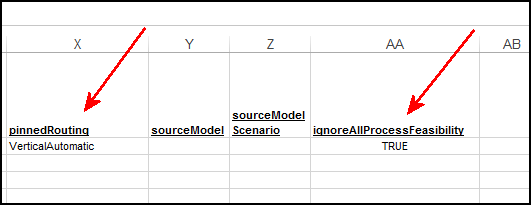
-
The pinnedRouting column accepts a separated list of process(es) and/or node(s) that specify a non-ambiguous routing, such as “VerticalAutomatic, 3 Axis Mill” in the Casting: Sand process group.
-
The column is case-sensitive.
Note:
“Non-ambiguous” does not mean “unique”. A pinned routing string is considered ambiguous and will be rejected if it matches a disjoint set of routings. In other words, aPriori allows anything that you can achieve via the Routing Selection view, where you can pin a single routing or group of routings, including all down-stream alternatives, but does not permit multi-selections.
-
If you specify only “VerticalAutomatic” in the pinnedRouting column, aPriori only evaluates the VerticalAutomatic routing branch in Casting: Sand, but it evaluates all possible secondary machining routings for that scenario.
- If you specify “VerticalAutomatic, 3 Axis Mill”, only the 3 Axis Mill secondary routing for VerticalAutomatic is evaluated.
- If you enter “aPriori” in the pinnedRouting column, then any previously pinned routings for the specified process group will be un-pinned and all possible routings evaluated.
- If the components to be costed do not exist in the database, then the Pinned Routing may be left blank and all possible routings will be evaluated.
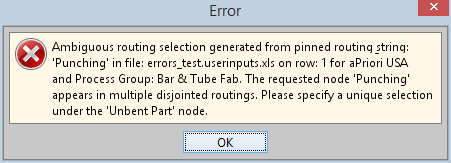
- If you specify an ambiguous routing, aPriori generates an error message when it attempts to open a Bulk Loader that reads this spreadsheet. (Error messages are displayed as soon as the error is encountered. You may need to iterate through multiple errors and fixes when debugging changes to a User Inputs spreadsheet.)