Usability and Performance Enhancements
aPriori 2026 R1 SP2 provides the usability and performance enhancements listed below.
Multi-Scenario Import and Open After Import
You can now select multiple scenario files to import at once from a folder location, rather than importing one file at a time. Conflicts against scenarios already in the database, and across the selected files, are presented in a single consolidated dialog. After import, you can also choose to open the imported scenarios directly using a new option in the import completion dialog.
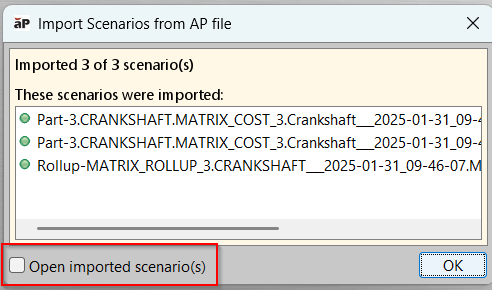
Imported scenarios are not opened automatically by default; Digital Factory administrators can change this default using the apriori.import.scenario.auto.open.limit setting in apriori.properties.
Publishing Performance Regression for System Admin Updates Resolved
aPriori 2026 R1 SP2 resolves a performance regression, introduced in earlier releases, that caused publishing times to increased significantly compared to aPriori 2026 R1. This publish-time increase was seen when items were saved within the System Admin toolset.
This release introduces batch query optimizations to the save path, restoring publishing performance to expected levels.
Spreadsheet Report: File Name Now Populates Correctly
aPriori 2026 R1 SP2 resolves an issue that caused the file name to be populated incorrectly during generation of a Spreadsheet Report. This issue occurred only for part names that included a “.” (dot) character. The report file was assigned an empty or incorrect name, requiring users to manually rename the file after download. This release ensures the expected file name is applied to all Spreadsheet Report exports.
Custom Digital Factories Now Listed Before aPriori Baselines
With the release of aPriori 2026 R1 SP2, aPriori now displays your
custom Digital Factories before any aPriori baseline Digital Factories
in the Digital Factory selection list.
This makes it easier to locate and select
your organization's configured Digital Factories when
you prepare scenarios for analysis.
Custom Material Purchase Factors No Longer Revert to Digital Factory Level for Non-Default Purchase Volumes
aPriori 2026 R1 SP2 resolves an issue where custom material purchase factors defined at the material-type level were not applied when a user changed the purchase volume in the Material Selection window to a value other than the default. Instead, the Digital-Factory-level purchase factor was displayed and used in costing, even when a material-type-specific factor had been defined for that purchase volume. This release ensures that material-type-level purchase factors are correctly applied across all purchase volumes in both the Material Selection UI and costing results.
For more information about Material Factors, see Working with Material Factors in the Digital Factory Administration Guide.