Using the Digital Factory Toolset
The Digital Factory toolset allows you to run a range of management functions for Digital Factories.
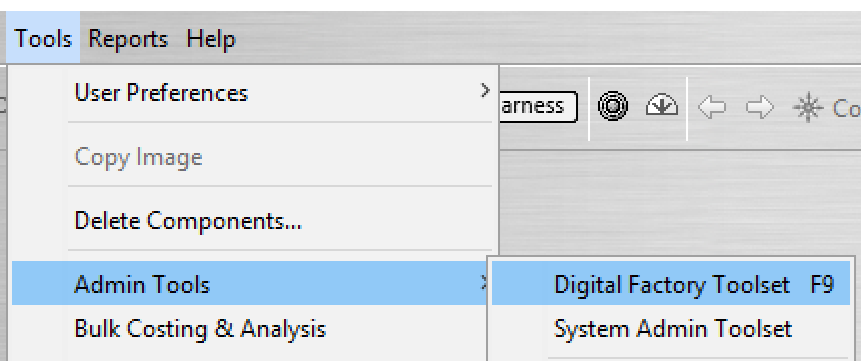
To access the toolset, from aP Pro, select Tools > Admin Tools > Digital Factory Toolset.
This displays the aPriori Digital Factory Toolset menu.
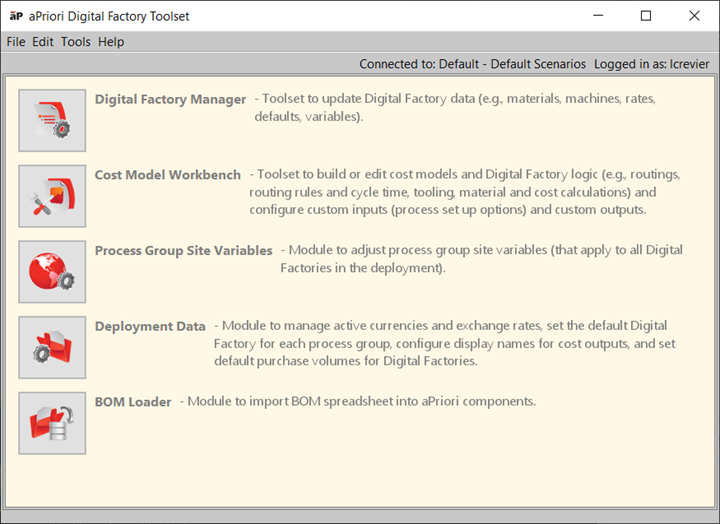
Toolset functions
| Option | Description |
|---|---|
| Digital Factory Manager | Update Digital Factory data, such as materials, machines, rates, defaults, and variables. See Introduction to the Digital Factory Manager. |
| Cost Model Workbench | Update Digital Factory logic; build or edit cost models, modify Digital Factory logic, and configure custom inputs and outputs. See the aPriori Cost Model Workbench Guide (login required). |
| Process Group Site Variables | Modify site variables for process groups, which impact how GCDs are analyzed by aPriori when it generates cost estimates for all the Digital Factories in the deployment. See Pocess Site Group Variables. |
| Deployment Data | Manage active currencies and exchange rates, set the default Digital Factory for each process group, and configure display names for cost outputs. See Deployment Data Administration |
| BOM Loader | Import BOMs (Bills Of Materials) and populate your aPriori database with components and cost data. See BOM Loader. |
Toolset Menu Options
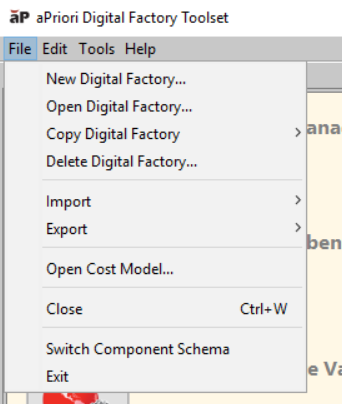
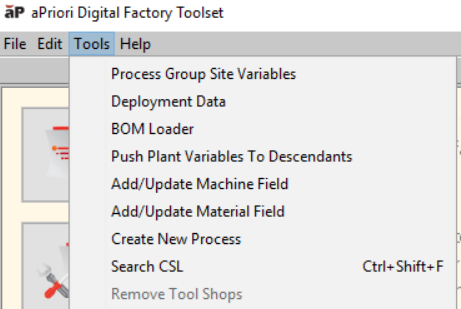
File and Tools menus give additional access actions.
Toolset File Menu Options
| Option | Description |
|---|---|
| New Digital Factory… | See Introduction to Creating Digital Factories. |
| Open Digital Factory… | See Open a Digital Factory. |
| Copy Digital Factory… | See Copy a Digital Factory. |
| Delete Digital Factory… | See Delete Digital Factories. |
| Import options | See Introduction to Importing Digital Factories. |
| Export options | See Introduction to Exporting Digital Factories. |
| Open Cost Model… | See the aPriori Cost Model Workbench Guide (login required). |
| Close | Close the window. |
| Switch Component Schema | See Selecting your deployment site |
| Exit | Exit the Digital Factory toolset. |
Toolset Tools Menu Options
| Option | Description |
|---|---|
| Process Group Site Variables | See Process Group Site Variables. |
| Deployment Data | See Deployment Data Administration. |
| BOM Loader | See BOM Loader. |
| Push Plant Variables to Descendants | See Determining if a Digital Factory is an overlay. |
| Add/Update Machine Field | See Adding a Machine. |
| Add/Update Material Field | See Adding a Material Field. |
| Create New Process | See Creating a New Process for a Process Group. |
| Search CSL | See Search CSL. |
| Remove Tool Shops | See Removing Tool Shops. |
Search CSL
You can use the Search CSL option to find specific strings of code or text within a cost model and understand where formulas or settings are defined in the cost model source files.
Select Tools > Search CSL, then enter details in the Search CSL dialog; results appear in the right hand pane.
Click on an entry to show the entire file in the lower-right pane.