Group management spreadsheet template
A group management template spreadsheet is available at:
The template has four sheets:
- groups
- attributes
- permissions
- sheetIndex
Groups sheet
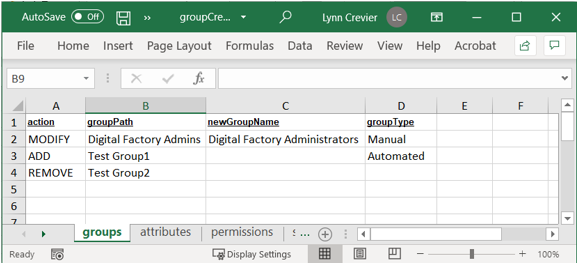
The groups sheet has the following columns:
-
action: contains one of three values (must be in upper-case):
- ADD
- MODIFY
- REMOVE
-
groupPath: contains the path where the group being modified or deleted can be found. In case of new group creation - this will be the path of the new added group. If group already exist - then import will do nothing (i.e. there will be no duplicates after import).
- newGroupName: contains new group name in case of group modification (applicable only for MODIFY action). If value in this column is not set, then group name will not be changed.
- groupType: contains one of three values:
- NONE
- MANUAL
-
AUTOMATED
The types are applied as follows: * If action=ADD, this value will be the group membership type of the newly created group. * If action=
MODIFY, this value will be the new group membership type (if desired). If this value is not set, the membership type of the group will not be changed. * If action=REMOVE, this value is not needed: the group to be removed is searched only by its path.
The types are applied as follows:
Example
Attributes Sheet
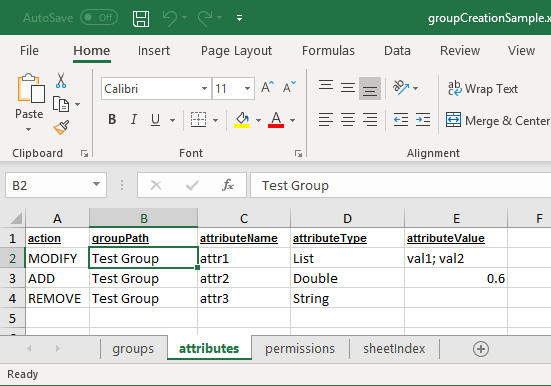
The attributes sheet has the following columns:
-
Action: contains one of three values (must be in upper-case):
- ADD: Create a new attribute
- MODIFY: Edit an existing attribute
- REMOVE: Eelete an existing attribute
-
groupPath: Contains the path of the group to which the attribute belongs.
- attributeName: Contains the name of the attribute which should be modified or removed. If action=ADD, this value will be the name of the newly created attribute. If the attribute already exists, import will do nothing (that is, duplicates will not be created).
-
attributeType: contains one of the following values:
- Boolean
- String
- List
-
Double
Note the following behavior: * If action=ADD, this value will be the type of newly created attribute. * If action=MODIFY, this value should contain the exact type of attribute to be found and modified. Note that the attribute type itself cannot be modified. * If action=REMOVE, this value it not needed; the attribute to be removed will be searched by group path and name.
-
attributeValue: contains the value of the newly created attribute (when action= ADD), or the new value of the modified attribute (when action=MODIFY).
Double values should contain decimal points. List values should be separated with semicolons.
Example:
Permissions Sheet
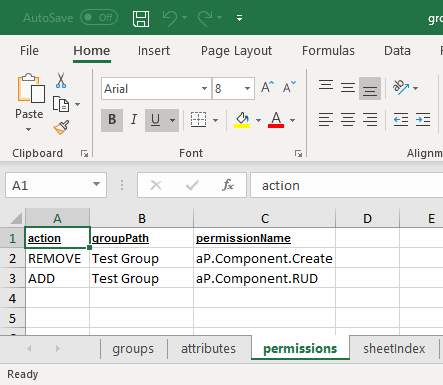
The permissions sheet has the following columns:
-
action: Contains one of two values (must be in upper-case):
- ADD: Create a new group permission.
- REMOVE: Delete a group permission.
-
groupPath: Contains the path of the group to which the permission belongs.
-
permissionName Contains the name of the permission.
If action=ADD, this value will be the name of the newly added permission. If the permission has been added already, import will do nothing (that is. duplicates will not be created).
If action=REMOVE, this value is the name of the permission to be removed.
Example:
SheetIndex Sheet
An Excel index sheet for navigating to other sheets. Do not edit.
Import Results and Error Messages
Upon completion, the group loader displays a short summary:
groupLoad:
     [java] -------------------------------------------------
     [java]                 BEGIN GROUP LOAD
     [java] -------------------------------------------------
     [java]
     [java]
     [java] Import summary:
     [java]
     [java] Groups added: 1
     [java] Groups modified: 0
     [java] Groups removed: 0
     [java] Groups processed with errors: 2
     [java]
     [java] Permissions added: 0
     [java] Permissions removed: 0
     [java] Permissions processed with errors: 2
     [java]
     [java] Attributes added: 1
     [java] Attributes modified: 0
     [java] Attributes removed: 0
     [java] Attributes processed with errors: 2
     [java]
     [java] See apriori.log for details.
     [java]
     [java] -------------------------------------------------
     [java]                 END GROUP LOAD
     [java] -------------------------------------------------
     [java]
BUILD SUCCESSFUL
Total time: 10 seconds
If errors are listed, check the apriori.log file, which is typically located in:
C:\<userHomeDir>\aPriori\<aPrioriVersion>\logs