Overlay configuration example
Frequently users want to customize machines and materials in way that does not differ across regions. Suppose, for example, that you want to add a new machine to each of your regions’ Digital Factories. And suppose that, in every region, you want the new machine to have all the same properties, except for labor and overhead rates, which will vary by region. You can use overlays to avoid explicitly adding the machine to each regional Digital Factory. Follow these steps:
- Create a cost model template Digital Factory: create a disassociated copy of any baseline Digital Factory. This Digital Factory will be used for cost model logic and metadata, which are the same across all baseline Digital Factories. (It is disassociated so that it can contain cost model logic customizations that will not be lost when you upgrade to an aPriori release with new cost model versions. These steps illustrate a configuration that allows you to update your Digital Factory data based on new RDLs while leaving your cost model version unchanged.)
-
Create a materials overlay Digital Factory: create a new Digital Factory to contain your customizations of materials. Specify its inheritance as follows:
-
Cost Model Digital Factory: the cost model template Digital Factory created in step 1, above
-
Material: any baseline Digital Factory
-
Economic Data: any baseline Digital Factory (The regional data in this Digital Factory will not be used.)
-
Machines: any baseline Digital Factory
-
Tool Shops: any baseline Digital Factory (The tool shop data in this Digital Factory will not be used.)
-
-
Create a machines overlay Digital Factory: create a new Digital Factory to contain your customizations of machines. Specify its inheritance as follows:
-
Cost Model Digital Factory: the cost model template Digital Factory created in step 1, above
-
Material: any baseline Digital Factory
-
Economic Data: any baseline Digital Factory (The regional data in this Digital Factory will not be used.)
-
Machines: any baseline Digital Factory
-
Tool Shops: any baseline Digital Factory (The tool shop data in this Digital Factory will not be used.)
-
-
Create regional overlay Digital Factories: specify each one’s inheritance as follows:
-
Cost Model Digital Factory: the cost model template Digital Factory created in step 1, above
-
Material: the materials Digital Factory created in step 2, above
-
Economic Data: the baseline Digital Factory for the current region (This data allows the calculation of the machine properties that vary by region—labor and overhead rates.)
-
Machines: the machines Digital Factory created in step 3, above
-
Tool Shops: the baseline Digital Factory for the current region
-
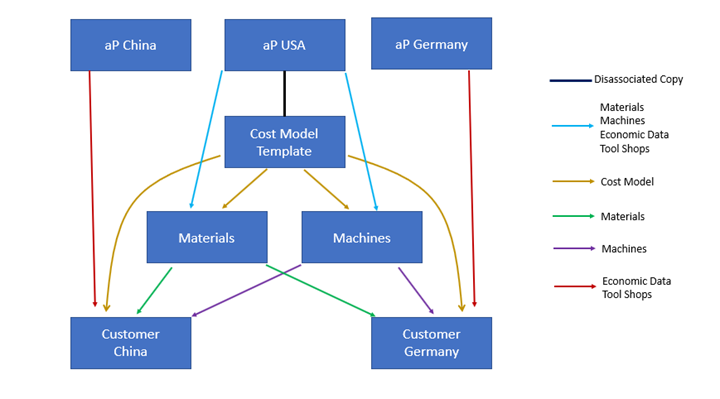
The diagram below represents this example configuration. Boxes represent Digital Factories. Arrows represent inheritance. Arrow colors indicate what is inherited.
Region-dependent Digital Factory Variables
Following are the Digital Factory variables that are considered to be region dependent (see Select Base Digital Factories dialog):
- Add Facility Cost to Direct Overhead
- Batches per Year
- Default Annual Volume
- Default Production Life
- Efficiency
- Electricity Rate
- Engineering Support Allocation
- Engineering Support Rate
- Facility Electricity Factor
- Facility Heat and Gas Factor
- Facility Water Factor
- Fire Insurance Factor
- Gas Rate
- Hours per Shift
- Imputed Interest Rate
- Indirect Overhead Percent
- Liability Insurance Factor
- Limitations
- Loss Insurance Factor
- Maintenance Support Allocation
- Maintenance Support Rate
- Margin Rate
- Material Overhead Percent
- Min Payback Period
- Non Production Footprint Factor
- Objective
- Period Overhead Coefficient
- Production Days per Year
- Purchasing Power Factor
- Purchasing Support Allocation
- Purchasing Support Rate
- Quality Support Allocation
- Quality Support Rate
- Rent Rate
- SG&A Percent
- Shifts per Day
- Tool Crib Support Allocation
- Tool Crib Support Rate
- Tooling Mode
- Use Computed Overhead Rate
- Use Indirect Overhead Percentage