Digital Factory Administration Overview
Info:
See the Digital Factory Manager aP Academy training course for more details.
An aPriori Digital Factory is a virtual representation of a physical factory environment, including details for machines, workcenters, processes, process routings, and process groups.
For example, for each machine, a digital factory includes performance specifications, such as size limits, power requirements, and operating costs.
See Understanding Digital Factories for more details.
Note:
Your organization will need one or more Digital Factory Administrators with appropriate permissions. See the System Admin Guide for details of assigning roles.
Using Digital Factories
Digital Factories build the data you need to calculate cost, manufacturability, and sustainability for components.
You can use Digital Factories to give region-accurate cost information for the components you want to manufacture. You can also quickly compare costs in different areas to help choose a supplier's manufacturing site.
Baseline and Custom Digital Factories
Baseline
aPriori provides baseline (starting point) Digital Factories that represent average manufacturing costs across various geographic regions; for example, aPriori USA. You can use these as an initial configuration for a production deployment to give initial benchmark estimates and manufacturing guidance, based on general manufacturing practices and average labor rates.
Custom
You can create and configure your own Digital Factories to closely match your in-house manufacturing environment and cost structure, or those of a supplier.
These digital factories can inherit values from other digital factories, allowing you to easily maintain and update common data and logic.
Info:
See Introduction to Creating Digital Factories for more details.
aPriori also provides specialized Digital Factories to implement PCBA and Wire Harness assemblies. See the Electronics Guide for more details.
Digital Factory Toolset
To access Digital Factory toolset functions, from aP Pro select Tools > Admin Tools > Digital Factory Toolset:
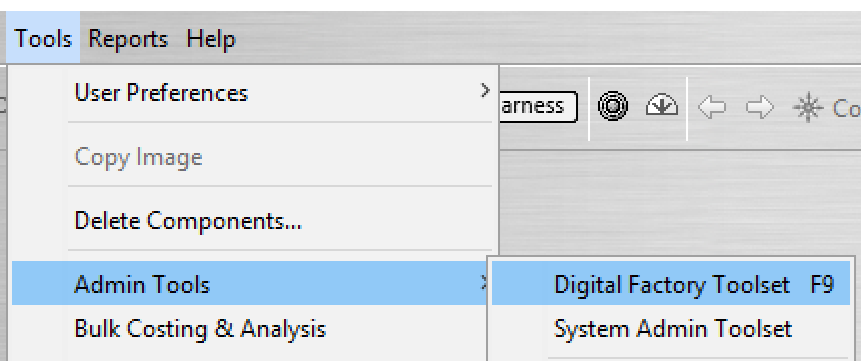
See The Digital Factory Toolset for more details.
More Information
You can find more information about the aPriori application in the following documents:
- Cost Model Guide and Cost Model Workbench User Guide (login required) – these guides contain detailed information about process groups used by Digital Factories, and using aPriori’s Cost Model Work Bench (CMWB) to customize cost models that form Digital Factory logic.