Stock Machining
See also the Machining process group.
Geometry or Cost Engine Changes that Could Impact Configured Digital Factories
The following changes might impact costing, even for Digital Factories that use earlier cost model versions.
-
Chains of Adjacent Surfaces (impacts operation assignment, tool selection, and cycle time): this release provides enhanced geometry recognition to identify chains of adjacent surfaces that are likely to be finished with the same side milling tool.
The image below shows improved operation assignment for two example parts analyzed with a 4-Axis Mill routing. In the previous release, some surfaces of these parts that should have been assigned side milling were instead assigned facing. This release correctly assigns side-milling to those surfaces.
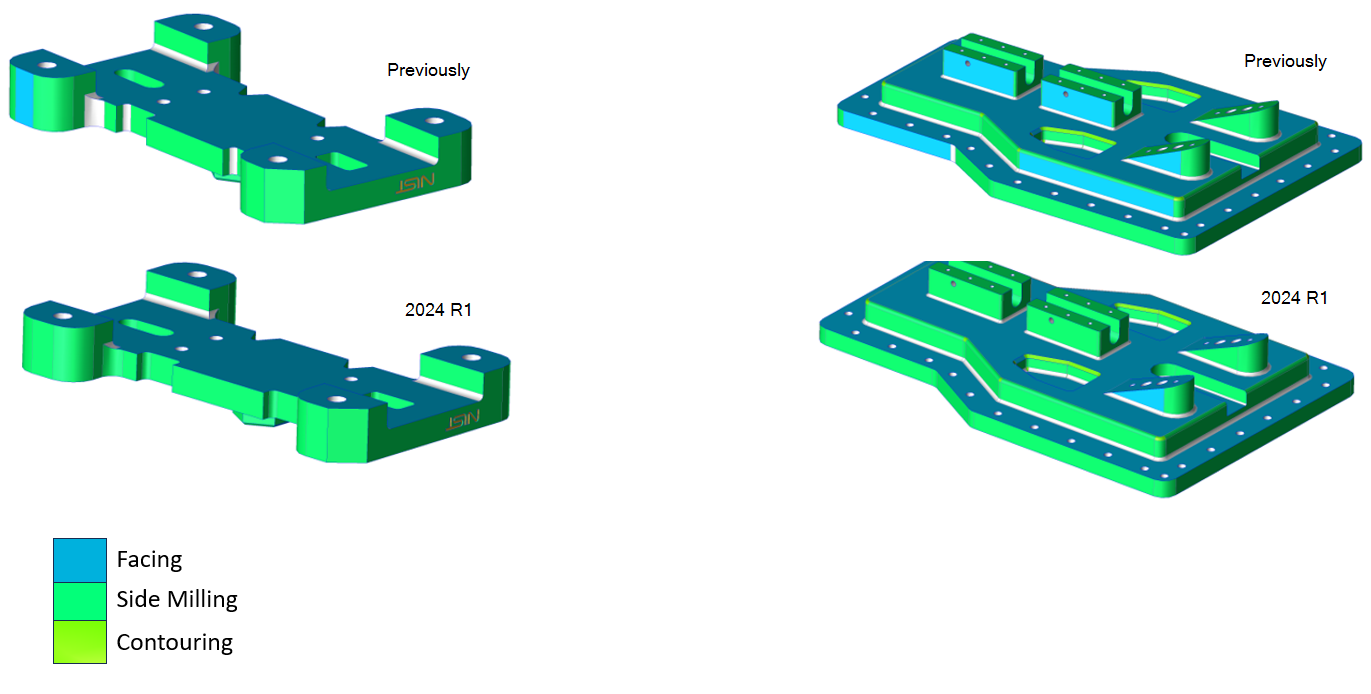 Additionally, this release improves recognition of fillet surfaces that can be machined indirectly by the radius of a bull nose end mill. Now such fillet surfaces are more likely to be assigned Indirect Filleting operations instead of a less-realistic finish machining operation.
This change affects parts analyzed on all routings with milling processes: 3-Axis Mill, 4-Axis Mill, 5-Axis Mill, 3-Axis Lathe, Mill Turn, and Multi-Spindle Machining routings.
For a set of test parts analyzed with 3-Axis Mill, 4- Axis Mill, and 5- Axis Mill routings, cycle time increased 4% on average, compared to release 23.1.2.
Note:
To access this improved functionality you must use the latest cost model version for the Machining process group (CMV 300). In addition, you must use the latest cost model version for Stock Machining (CMV 200).
Set the site variable parallelSurfaceChainAlgorithm as follows, depending on your cost model version:
- Open Chain (default), if you are using the latest cost model version
- Closed Loop, if you are using a prior cost model version
Important:
By default, the site variable parallelSurfaceChainAlgorithm is set to Open Chain, so you must change the value to Closed Loop if you do not upgrade your Stock Machining and Machining cost model versions.
-
Automatic Extraction of Eccentric Turning Axes (no impact by default; impacts operation assignment if enabled): This release supports automatic extraction of turning axes for rotationally-symmetric features that are offset from the stock axis and can be made by eccentric turning operations (see the example part below).
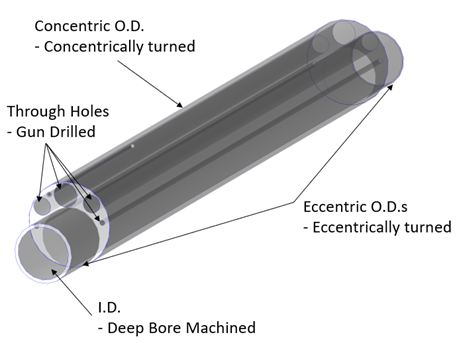 This new functionality is appropriate for any parts that have eccentrically turned features as well as deep bore machined features that are eccentric to the stock axis.
The new functionality is disabled by default. To enable it, change site variable settings as specified in the following table:
Site Variable Default Recommended Enabled Starting Value Description turnAxisMinHoleLtoDRatio 0 10 Minimum length-to-diameter ratio that is necessary to consider a hole parallel to the stock axis as a candidate for an additional turning axis. 0 disables automatic assignment of eccentric turning axes. turnAxisMinHoleDiameterMm 0 31.5 Minimum hole diameter that is necessary to consider a hole parallel to stock axis as a candidate for an additional turning axis. 0 disables automatic assignment of eccentric turning axes. maxNumTurningAxes 1 10 Maximum number of possible turning axes extracted. 0 disables all automatic assignment of turning axes (both eccentric and concentric). A value of 1 (default) allows a single turning axis that is coincident with the stock axis
Bug Fixes or Small Improvements to Prior Cost Model Versions
The following changes might impact costing for Digital Factories that use earlier cost model versions.
- NO IMPACT
Cost Model Changes that don't Affect Configured Digital Factories
The following changes do not affect costings with Digital Factories that use earlier cost model versions. The changes are available only in the latest cost model version.
- NO IMPACT