Introduction to the Digital Factory Manager
Tip:
See also the Digital Factory Manager aP Academy training course.
You can use the aPriori Digital Factory Manager to:
- Update Digital Factory data, including machines, materials, rates, defaults, and variables.
- Open, import, export, and delete Digital Factories, and view Digital Factory change logs.
- Create and define a custom Digital Factory, inheriting data from other Digital Factories.
Note:
You must purchase a separate license to create and copy Digital Factories. See Manage Licenses.
Examples
Here are some examples of how to use the Digital Factory Manager:
- Evaluate region-specific data: You can use the Digital Factory Manager to view and edit variables, lookup tables, and machine and material data, to ensure each site uses the correct regional process, machine, material, and wage data.
- Simulate In-House Facility: You can configure a new manufacturing facility in a new region, using machine data from an existing facility, by using the Digital Factory Manager overlay functionality to inherit digital factory information.
- Improve your Facility Representation: Your facility has added steel presses and routing machines, with higher cycle times. You can update your Digital Factory, editing plant variables and Lookup Tables to map these new capabilities.
- Update Machine and Material Data: Your facility needs to migrate from steel to aluminum for the chassis and body panels of an SUV model. You can update your Digital Factory to add the new material stocks to the material list, and remove the old material stocks.
Launch the Digital Factory Manager
- From aP Pro, select Tools > Admin Tools > Digital Factory Toolset, then click Digital Factory Manager.
- Select to open a Digital Factory (see Open a Digital Factory) when prompted.
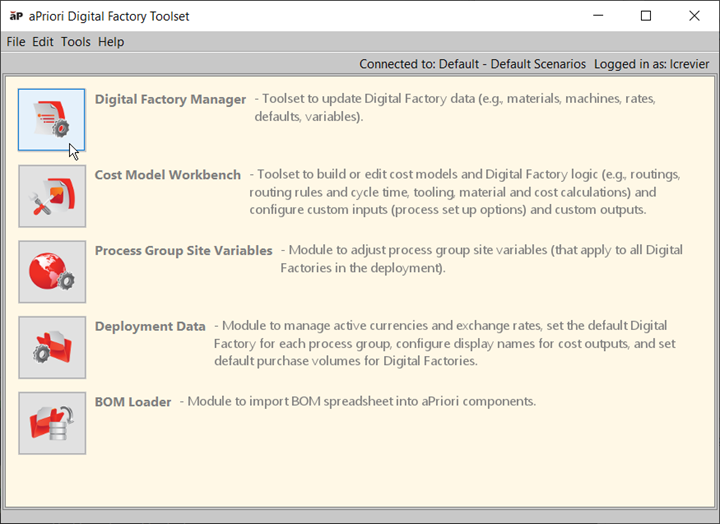
You can:
- Open an existing Digital Factory - see Open a Digital Factory.
- Create a Digital Factory - see Creating a new Digital Factory.
- Export a Digital Factory - see Export a Digital Factory.
- Create and manage Overlays - see Working with overlay (Inherited) Digital Factories
You can also edit the data contained in each Digital Factory- see Editing Digital Factories.