Cost Model Workbench Enhancements
New Message Editor available in the Cost Model Workbench
aP Pro 2026 R1 SP2 adds a dedicated editor for design guidance advice rule and cost driver message text to the Cost Model Workbench (CMWB). Previously, updating the display text for a design guidance or cost driver message required exporting the cost model to disk, editing the message file in a text editor, and reimporting the cost model. Digital Factory administrators can now edit message text directly within the CMWB. This is useful for customers who have configured their manufacturing process models (for example, adding new processes and/or DFM rules) and wish to provide corresponding message text.
The new Cost Model Messages Editor is available under the Global Cost Model Information section of the CMWB, as shown below.
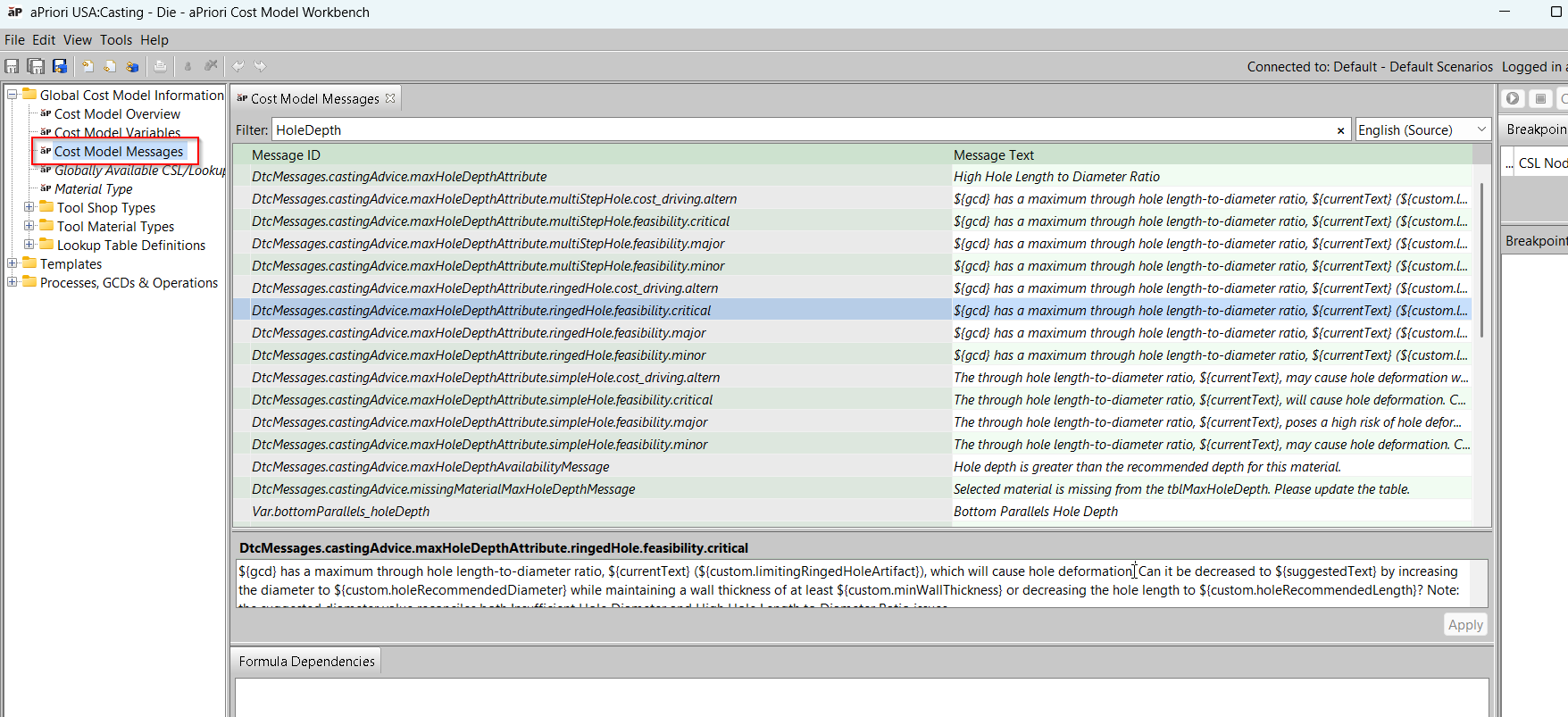
The message editor lists every message that applies to the selected cost model version, distinguishing text defined directly on that version from text inherited from a parent version. Administrators managing localized Digital Factories can switch between locales to edit the English source text and the translated text side by side, and can add, edit, or revert individual messages without leaving CMWB. Changes support full undo and redo.