Edit Sustainability data in Digital Factory Manager
This example shows how to edit the Electricity Carbon Factor value in Digital Factory Manager.
If you have a Digital Factory in aP Pro that is a digital twin of a manufacturing facility, it is important to keep the Digital Factory settings up-to-date. Maintaining correct data in the Digital Factory improves the accuracy of the cost and sustainability calculations in aP Pro.
Note:
If you do not have permission to access the aP Pro Digital Factory Manager, you can ask an aPriori or IT administrator to update your Digital Factories.
As an example, if a manufacturing facility has recently started using renewable electricity for all or part of its energy supply, to improve the accuracy of sustainability calculations, you can update the Electricity Carbon Factor in Digital Factory Manager.
When you edit Sustainability data in Digital Factory Manager and save the updated settings, the change is forwardly global. That is, aP Pro applies the new Sustainability data to any new scenario that you create, cost, or recost. However, the data in previously created and costed scenarios does not automatically update.
Requirements
To enter and analyze sustainability data, you must have an aPriori Sustainability License and aP Pro 2023 R1 or later.
Limitations
- aP Pro does not yet support Sustainability analysis for all process groups. For a list of currently supported process groups, see Processes supported in Sustainability.
- Carbon from product use, tooling, and end-of-life is not currently considered.
Prerequisites
This example requires that you have access to Digital Factory Manager. Access to aPriori Digital Factory Manager is typically controlled by the aPriori or IT Administrator in your company or organization.
Procedure
- Open a Digital Factory (for more information, see the Digital Factory Administration Guide).
- Save a copy of the Digital Factory as a backup.
-
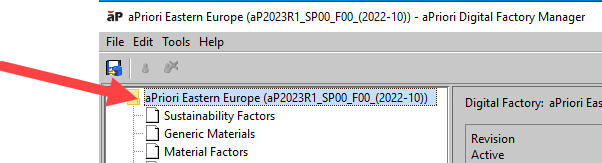
In the Digital Factory Manager window, click the Digital Factory name, the top item in the items list on the left.
-
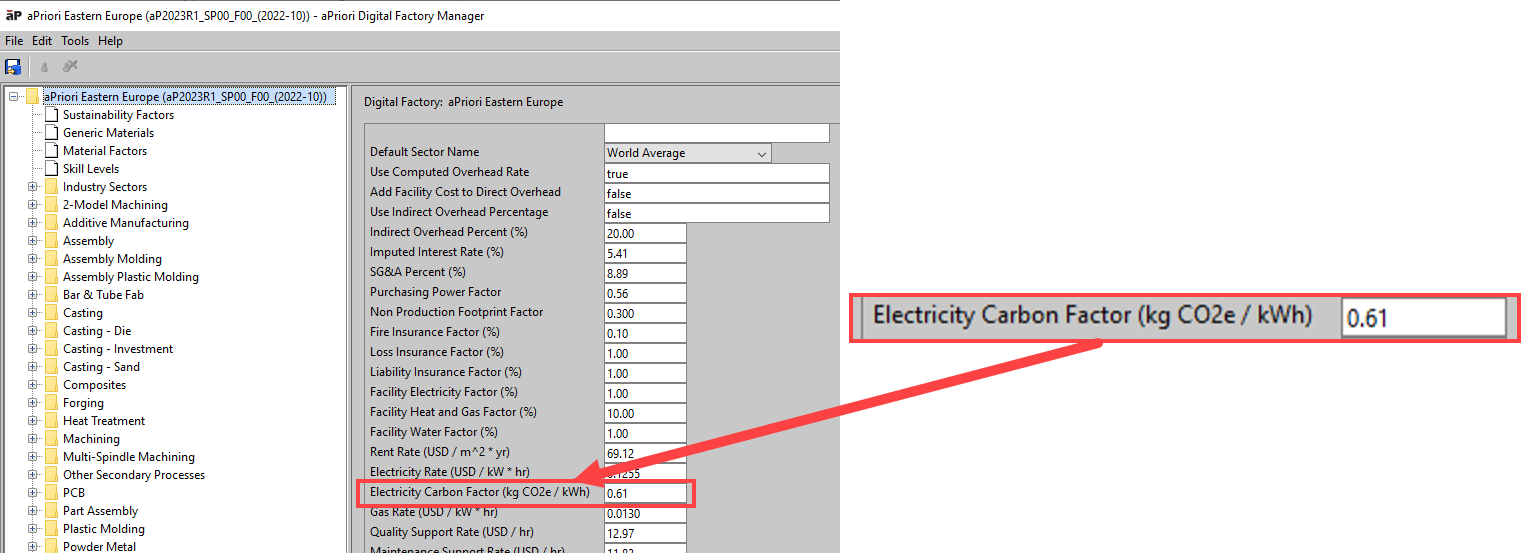
In the right side of the Digital Factory Manager window, scroll down to the Electricity Carbon Factor field.
-
Enter a new value for the Electricity Carbon Factor item. For example, a factor of 0 (zero) would indicate 100% renewable energy is being used to power the factory.
-
To save your changes, in the aPriori Digital Factory Manager menu bar, Select File > Publish Digital Factory
Tip:
Alternatively, in the toolbar, click the save button,
 .
. -
To close the Digital Factory Manager and return to the aPriori Digital Factory Toolset window, select File > Close.
Tip:
Alternatively, press Ctrl+W, or, on the title bar, click the close button,
 .
.