Introduction to Overlay Digital Factories
You can use inheritance (or “overlays”) to configure aPriori to your organization’s needs, leveraging cost insights, reaping savings, and increasing efficiency with digital factories. You can use inheritance when creating a custom Digital Factory that replicates an in-house manufacturing facility, using variable data to better represent your factory's capabilities.
The Overlay Digital Factory maintains a link to its parent(s) — logic and data updates to the parent are passed on based on your preferences. So you can make a change in a single parent, and that change will apply to all children.
You can customize the overlay Digital Factory, and these customizations get re-applied after the overlay is updated from a parent Digital Factory. Individual data points in all Digital Factory tables can be overridden, along with individual files in the cost model.
An Overlay Digital Factory inherits cost model logic and machine, material, toolshop, and economic data from one or more parent Digital Factories to create a custom Digital Factory.
Using Inheritance
When creating an Overlay Digital Factory, you must choose a baseline Digital Factory for the cost model logic, selecting one that is geographically and operationally similar to the factory you want to model. You must also select the source of Digital Factory data (machines, materials, tool shop). You can create an overlay Digital Factory from a baseline Digital Factory, a custom Digital Factory, or from another overlay Digital Factory.
When Digital Factories are created using these templates and databases, you can use Inheritance to minimize updates on individual Digital Factories.
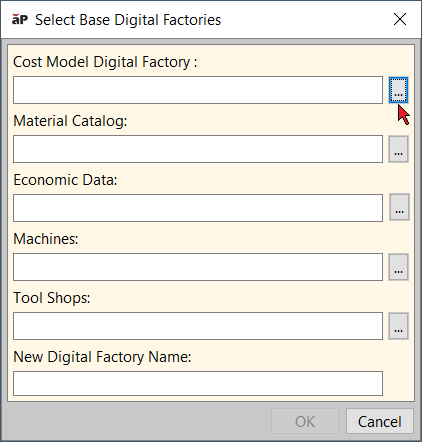
An overlay Digital Factory can inherit values from up to five different parent Digital Factories, one each for the following:
- Cost Model
- Material Catalog
- Economic Data
- Machines
- Tool Shops
Note:
Cost model variables in an overlay Digital Factory are inherited from the Machine Digital Factory.
When you save an overlay Digital Factory, only the customizations are stored. When you open an overlay Digital Factory, aPriori first loads the data from the parent Digital Factories, and then applies all the local customizations.
You can create an overlay Digital Factory from a baseline Digital Factory, a custom Digital Factory, or from another overlay Digital Factory.
Info:
Inheritances must be updated after implementing new RDLs in yor system. See Update Overlay Inheritance.
Implementing Overlays
Implementing overlay Digital Factories in a logical fashion requires some advance planning and set-up.
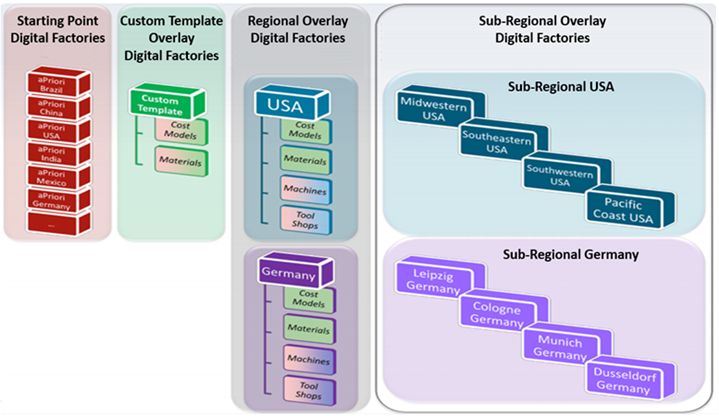
For example, if you are just beginning to set up your overlay Digital Factories, it does not make much sense to assign different baseline Digital Factories to the different areas of your overlay Digital Factory (such as aPriori USA to the Cost Model Digital Factory field, aPriori Mexico to the Material Catalog field, and aPriori China to the Machines field, etc.). Instead, you might create a master overlay Digital Factory for your company from one of the baseline Digital Factories, and customize it with company-specific overrides, and then create regional overlay Digital Factories from that master with their own customizations for machines and materials, and so on down to finer levels of resolution.
Info:
Using Overlay Digital Factories
aPriori baseline Digital Factories provide an initial place for you to set up your production Digital Factories. You are likely to create one or more custom Digital Factories to adjust or add some data and logic that reflect your manufacturing practices and buying power. You need to maintain your configurations and customizations, but you also want to continue to update data and logic from aPriori’s regular baseline updates.
Overlay Digital Factories can be useful in this environment because they inherit from their parents, and then re-apply customizations. This means that Digital Factories that are derived from an aPriori baseline Digital Factory automatically inherit baseline updates, without overwriting your customizations. When you use overlay Digital Factories, you minimize the number of places you need to update data and logic.
Info:
Examples
Here are some examples of how you might use overlay Digital Factories:
- Use an overlay Digital Factory to create a customized cost model based on aPriori baseline data, allowing you to keep it updated with baseline Digital Factory updates.
- Create a master custom cost model, but then create regional overlay Digital Factories from it which inherit the majority of the model, but which include small regional customizations (for example, the overlay Digital Factories all share the same underlying cost model for common processes, but each have their own routing structures).
- Same as above, except that the only difference between the child Digital Factories and the parent are the machine data, material rates, and logistics logic.
- Create a European overlay Digital Factory in Euros that is based on the USA baseline Digital Factory in US dollars.
- Create a European overlay Digital Factory in Euros that is based on a custom European Digital Factory in Euros.
Diagrams
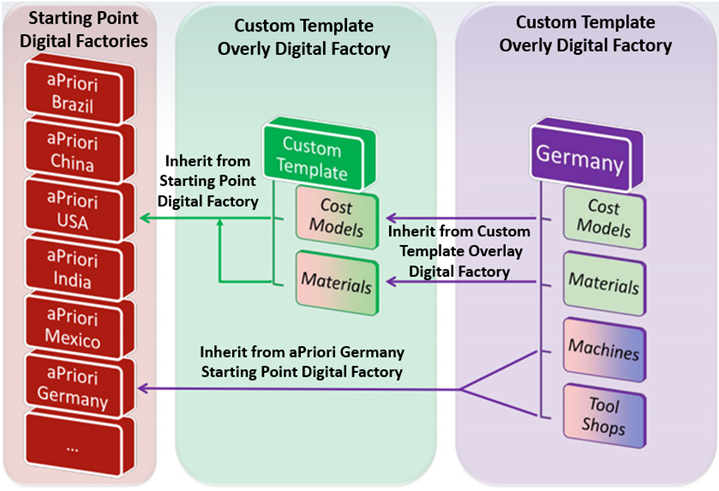
The following illustrations provide additional visual examples of overlay Digital Factory usage.
Note:
Updates to a parent Digital Factory are guaranteed to be propagated to child Digital Factories only after a restart of aPriori .
Overlays and Cost Model Data
Cost models define metadata such as columns and column types for machine, material, and tool shop tables. Therefore, if an overlay Digital Factory inherits its cost model from an aPriori baseline Digital Factory, the allowable columns for the overlay Digital Factory machines, materials, and tool shops are the columns that are defined in the cost model versions for the process groups in the aPriori baseline Digital Factory.
If you want a Digital Factory to have columns for machines, materials, or tool shops that differ from the columns that are defined by the baseline Digital Factory, first create an intermediary overlay Digital Factory that inherits columns from the baseline Digital Factory. Then, you customize the cost model metadata for the intermediary overly Digital Factory. Finally, create an overlay Digital Factory from the intermediary Digital Factory.
Example
This figure shows two cases, A and B, in which the two overlay Digital Factories are both based on the same baseline.
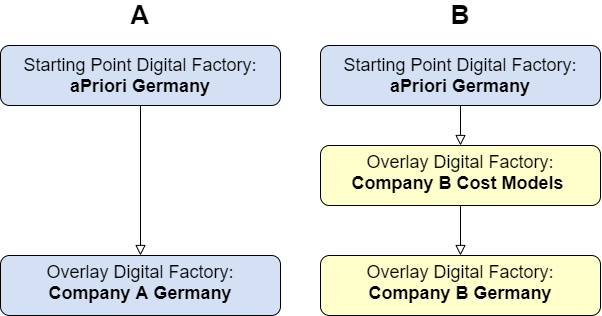
- For case A, the aPriori Germany baseline Digital Factory cost model meta data determines which columns are available for the machine, material, and tool shops table in the Company A Germany overlay Digital Factory.
- For case B, however, any additional columns that are defined in the cost model meta data for the Company B Cost Models, a customizable intermediary overlay Digital Factory, are available for the Company B Germany overlay Digital Factory.
Note:
When you override a material or a machine, there is no direct way to determine if a value is inherited or overridden. Digital Factory names must be unique and cannot include hyphens, slashes, or ampersands (-, /, &).