PCBA Costing Workflow
Tip:
See Cost a PCBA for specific details of using aPriori PCBA costing.
PCBA Costing Requirements
To cost a PCBA, aP Pro requires these inputs:
-
A Bill of Materials (BOM) spreadsheet, imported using the aP Pro BOM loader in a standardized, .csv format.
(aP Pro does not make any assumptions about the PCBA design tool you use, but does assume that this tool can output a BOM spreadsheet file to an editable .csv table format).
-
Standard prices for purchased components. You can provide the pricing data as part of the BOM file if you obtain it from the aPrioriElectronics Data Collection service or collect it independently. Alternatively, you can provide the pricing data in the form of a Component Library that maps your Customer Part Numbers to Manufacturer Part Numbers.
If you choose to provide the data in the form of a Component Library, work with aPriori Services to develop the initial configuration. After the initial construction, an aPriori administrator at your company must maintain your Component Library.
-
User inputs in the form of values provided via the PCBA Costing dialog box that appears when you click the PCBA button (or later as individual PSO settings).
Typical Workflow
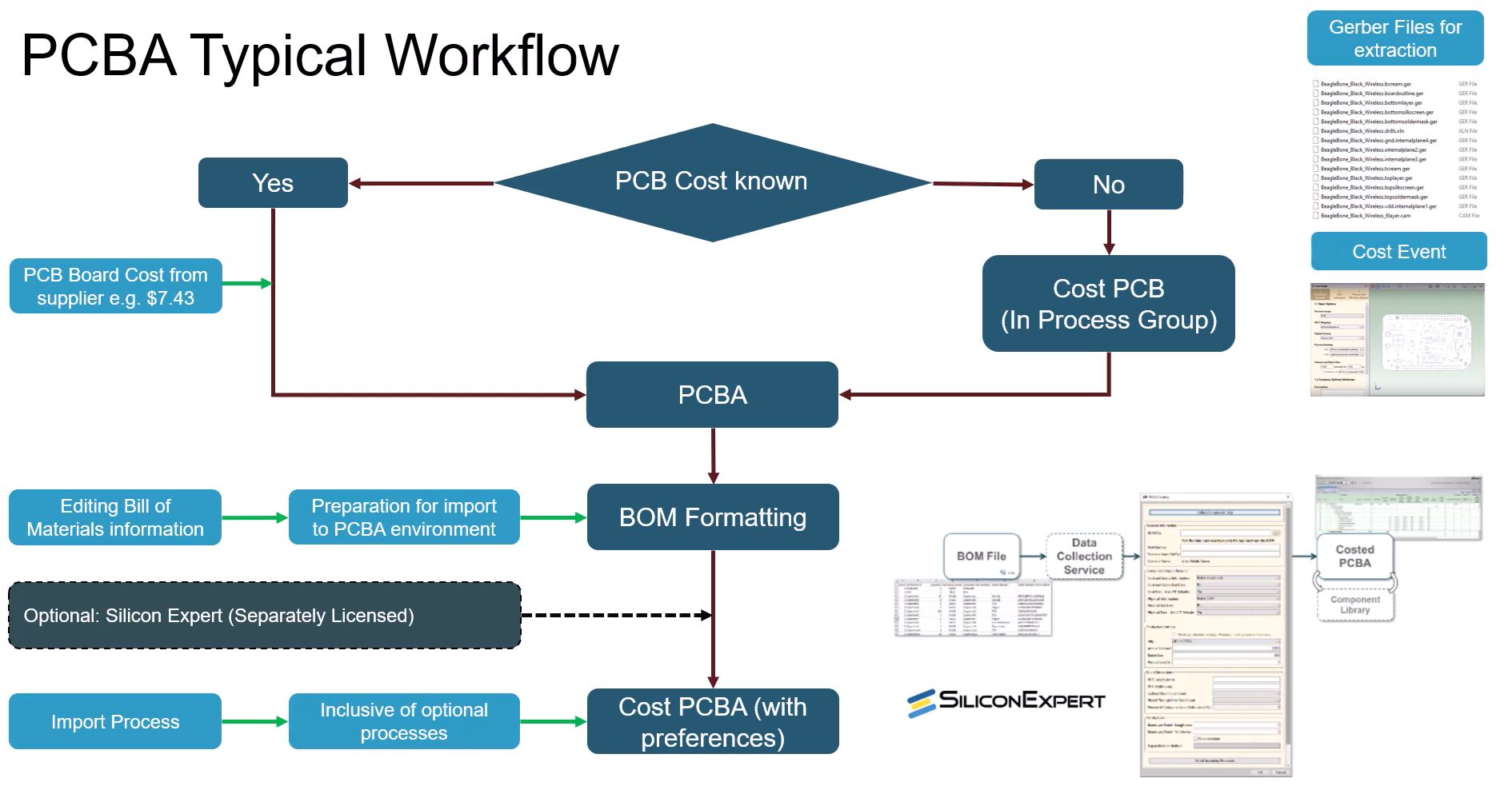
The diagram provides a high-level view of a typical PCBA costing workflow:
-
Initially, the workflow varies:
-
Unknown cost: If you do not know the cost of the initial PCB board, aPriori can establish a should-cost estimation using the dedicated PCB Process Group - see Cost a PCB. The cost determined can then be transferred into the PCBA environment and added to the complete assembly cost.
-
Known cost: you may already know the PCB board cost, perhaps because it is externally sourced from a supplier, and in this circumstance can progress directly to PCBA.
-
-
You can now edit the Bill Of Materials (BOM) associated with the PCBA and prepare it to import into the PCBA environment.
-
After uploading into aPriori, you can optionality use EDC (Electronic Data Collection) to collect additional data on component cost and information derived from the external, separately licensed platform, Silicon Expert.
Silicon Expert provides live costing of components as well as additional information on their physical characteristics which aPriori can then extract.
-
aPriori can transfer component cost data either by using inputted costs within the BOM file or by using Silicon Expert.
- Cost preferences for PCBA can then be set to be inclusive of optional processes and refine cost estimations.