Introduction to aP Pro
aP Pro allows you to analyze a part, generating lowest-cost recommendations, design guidance, and sustainability insights for that part.
Typical Analysis Process
-
Provide part information to aP Pro, including the part's CAD file, material, annual volume, production life, and high-level manufacturing process group (such as sheet metal or casting).
If a CAD file is not available (for example, with competitive tear-down and analysis of a product), aPriori provides user guided costing (see the Cost Model Guide), which allows you to enter the cost-driver values you know or can estimate, and then calculates costs based on the provided information.
-
aP Pro analyzes the part's design, identifies Geometric Cost Drivers (features such as holes and surfaces), and extracts geometric information about each one.
- aP Pro evaluates possible process routings (sequences of processes, where each process has a characteristic type of machine) and selects the routing with the lowest cost, providing costs, times, design guidance, and sustainability insights based on this analysis. See Routing Analysis Stages
You can make further changes to the inputs in aP Pro or to the part design in connected CAD files, and continue to refine the analysis to produce the best results for your part.
Info:
See Quickstart for more details.
Routing Analysis Stages
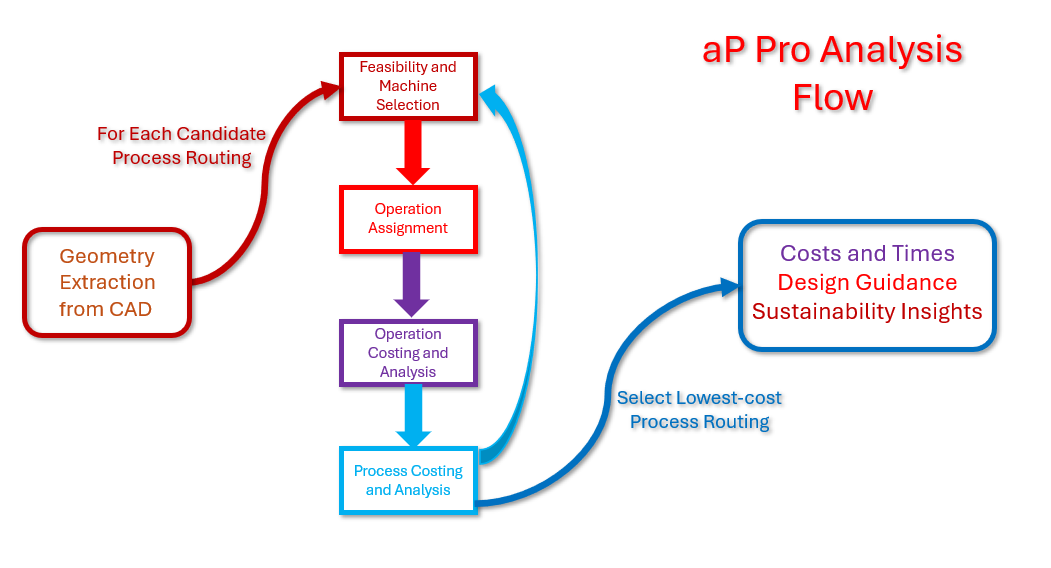
After geometry extraction (see Typical Analysis Process), aPriori performs the following steps for each possible process routing:
- Feasibility and machine selection: evaluates the routing’s feasibility, and removes it from consideration if it is infeasible (for example, because of the part's size or material). If the routing is feasible, aPriori selects an individual machine for each of the routing's processes.
- Operation assignment: selects a sequence of operations (such as drilling or milling) for each feature, and finds an appropriate tool for each operation in this sequence if needed.
- Operation costing and analysis: simulates each operation, generating times, costs, design guidance, and sustainability insights.
- Process costing and analysis: simulates each process (relying in part on the results of operation simulation), aggregates results across processes, and generates a fully burdened, per-part cost together with design guidance and sustainability insights.
Once each routing has been considered, aPriori selects the one with the lowest fully-burdened cost, and provides you with costs, times, design guidance, and sustainability insights based on the simulation and analysis of the selected process routing.