Advanced CSL logic examples
Using CSL maps
The following mapping determines the appropriate aPriori material name (such as ‘Aluminum, Stock, ANSI 5052’) for a variety of possible CAD property values (for example, ‘ALUMINUM_5052’). The CAD property name is ‘MATERIAL_NAME’ and the aPriori property name is ‘Material’:
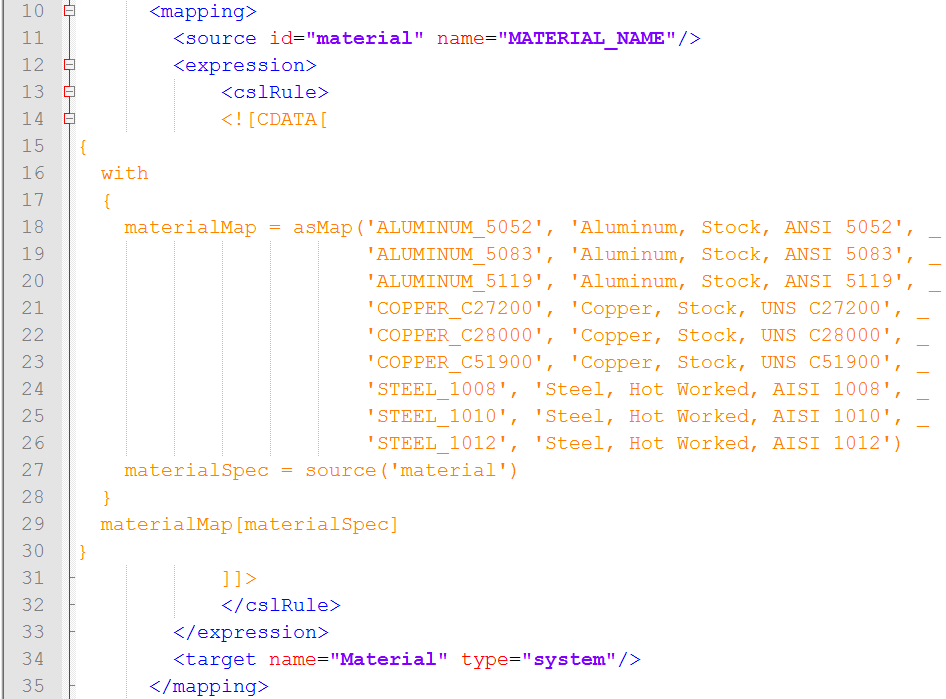
The built-in CSL function asMap takes as arguments an alternating sequence of keys and values:
You can use an expression in the following form to retrieve the value associated with a given key:
Here, the aPriori property value is specified by materialMap[materialSpec].
For more information, see the section on Map Functions in the aP Pro Cost Model Workbench Guide.
Using CSL string manipulation functions
The following example provides an alternative method of mapping property values that specify material names (see Using CSL maps). This example assumes that the CAD property values have the form shown in the previous example; that is, it assumes that CAD property values consist of either ‘ALUMINUM’, ‘STEEL’, or, ‘COPPER’, followed by an underscore, followed by a standard designation (such as the ANSI designation ‘5052’). This example implements the following mapping:
- ‘
ALUMINUM_<designation>’ is mapped to ‘Aluminum, Stock, ANSI <designation>’. - ‘
STEEL_<designation>’ is mapped to ‘Steel, Hot Worked, AISI <designation>’. - ‘
COPPER_<designation>’ is mapped to ‘Copper, Stock, UNS <designation>’.
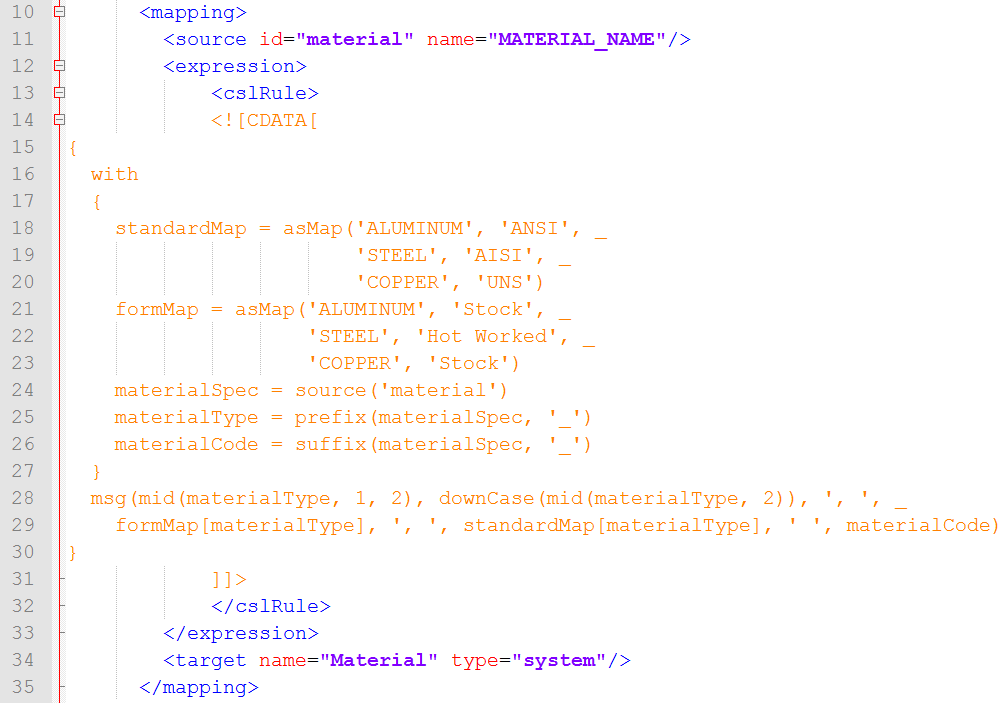
This mapping uses string manipulation functions to do both the following:
-
Parse the CAD property value into the material type name (
materialType) and the material standard designation (materialCode):prefix(materialSpec, ‘_’): returns the portion of the CAD property value that is before the underscore.suffix(materialSpec, ‘_’): returns the portion of the CAD property value that is after the underscore.
-
Convert the material type name from all uppercase to lower case (except for the initial letter):
mid(materialType, 1, 2): returns the first character of the material type name. In general,mid(string, i, j)returns the portion ofstringthat begins with theith character ofstringand ends with the character immediately preceding thejth character ofstring.mid(materialType, 2): returns the trailing characters of the material type name, that is, all the characters except the first one. In general,mid(string, i)returns the portion ofstringthat begins with theith character ofstringand ends with the last character ofstring.downCase(…): returns the result of converting to lower case the trailing characters of the material type name.
The aPriori property value is returned by the predefined CSL function msg, which takes a variable number of string arguments, and returns the string that results from concatenating the arguments.
For more information, see the section on String Functions in the aP Pro Cost Model Workbench Guide.
Using regular expressions in CSL
The following example, like the previous one, illustrates mapping property values that specify material names. Like the previous example, this one identifies a material type name (for aluminum, steel, or copper) and a standard designation (such as the ANSI designation ‘5052’) within the value of the CAD property (see Using CSL string manipulation functions).
But instead of assuming that the property value has a fixed format (type-name>_<designation>), this example handles a variety of formats. It assumes only the following regarding the format:
- Material type name and material designation occur somewhere in the CAD property value.
- For aluminum and steel, the material designation consists of 4 digits (and there is no 4-digit sequence that is not the designation).
- For copper, the material designation consists of ‘C’ followed by 5 digits (and there is no such character sequence that is not the designation).
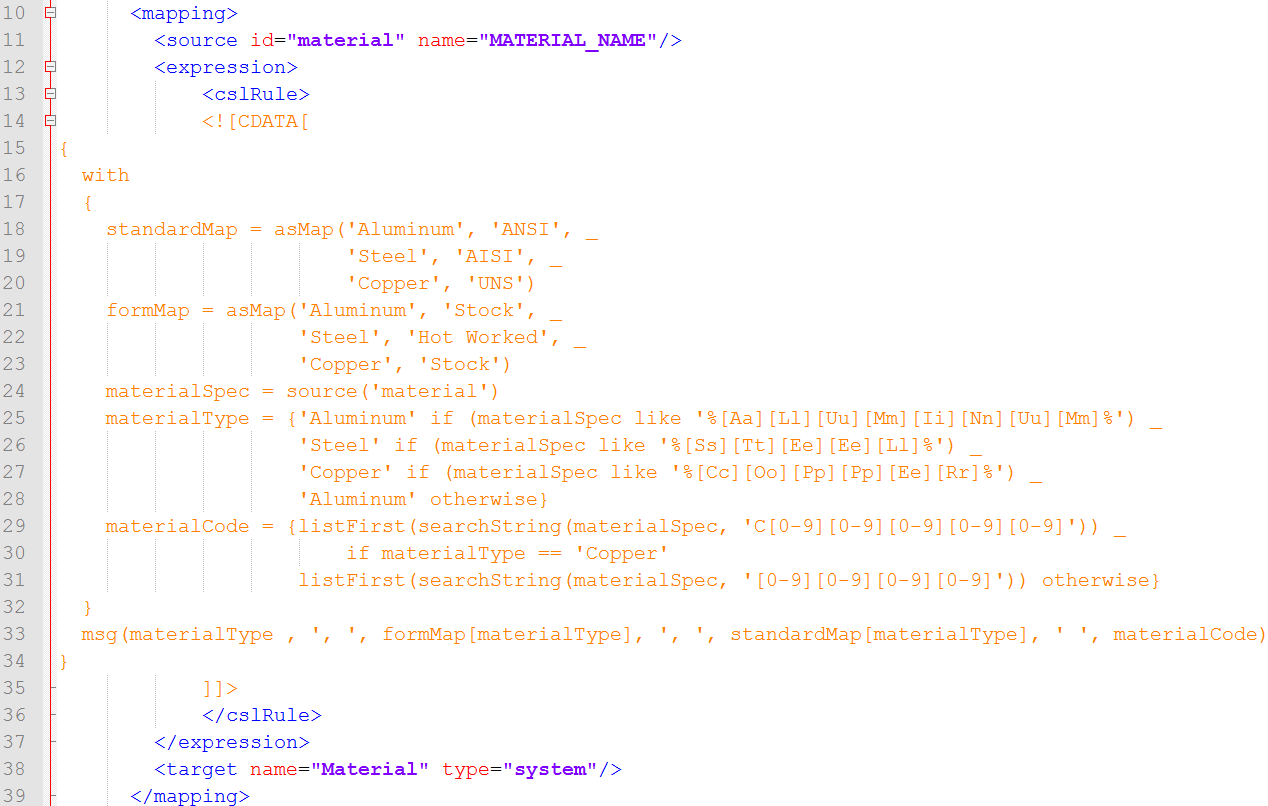
This example uses CSL like expressions to identify the material type. A like expression returns true if the string specified by the left operand matches the pattern specified by the right operand. Patterns are specified by regular expression strings; see the section on Like Expressions in the aP Pro Cost Model Workbench Guide. Here, the pattern for aluminum is specified by the following string:
This pattern matches any sequence of 0 or more characters, followed by ‘aluminum’ in any combination of upper- and lower-case characters, followed by any sequence of 0 or more characters. The patterns for steel and copper are similar.
The example also uses calls to the predefined CSL function searchString in order to identify the material standard designation (assigned to materialCode). This function returns a list of all portions of a specified string that match a specified regular expression pattern.
For aluminum and steel, the pattern is specified by the following string:
This pattern matches any sequence of 4 digits.
For copper, the pattern is specified by the following string:
This pattern matches any character sequence that consists of ‘C’ followed by 5 digits.
Since we assume that the CAD property value has only one substring that matches the specified pattern, the material designation is assumed to be the first (and only) element of the list returned by searchString. The first element is retrieved with the predefined CSL function listFirst.
For more information, see the section on String Functions in the aP Pro Cost Model Workbench Guide.
Using CSL foreach expressions
The following example illustrates a method for determining the aPriori Digital Factory corresponding to a CAD property that specifies a city. It is like an earlier example (see Basic examples of CSL logic), but this method uses a foreach expression instead of a conditional (if) expression:
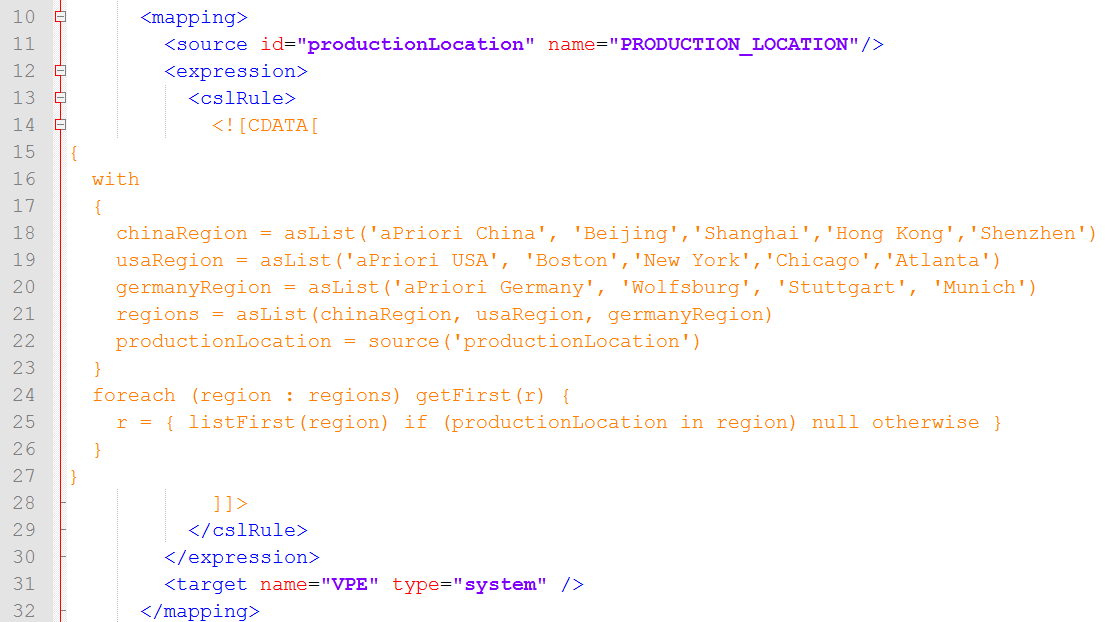
Here, chinaRegion is a list whose first element is the name of the China Digital Factory (‘aPriori China’), and whose remaining elements are the names of the cities associated with that Digital Factory. The lists usaRegion and germanyRegion have the same form. The formula regions is a list of lists; each of its elements corresponds to a region.
The foreach expression builds a result set by considering each region in turn:

If the CAD property value specifies a city that is in the region under consideration, the foreach expression adds to the result set the region’s associated Digital Factory (the region list’s first element, obtained with the predefined function listFirst); otherwise the foreach expression adds a null value to the result set:

The foreach expression uses the reduction function getFirst to return the first (and, presumably, only) non-null element of the result set:

To modify this mapping so that it handles a new, additional region, you would add a list for the region by using a formula that has the following form:
You would also modify the regions formula to add the new region:
For more information, see the section on foreach Expressions in the aP Pro Cost Model Workbench Guide.