Heat Map configuration basics
For basic configurations of the existing Heat Map menu criteria, you can edit the files found in:
Note:
For any configuration procedure, before you edit, backup files.
In general, you do the following:
- Make edits to
configHeatMap.xml - Make supporting edits to one or more properties files in the
messagessub-folder.
The examples provided in this section give a simple introduction to heat map configuration.
Heat map basic edit example
In this example, tolerances that begin with “C” (circularity, concentricity, and cylindricity) are important tolerances. The task is to create their own grouping in the heat map Criterion drop-down menu and append “Tolerance” to their names in the menu.
Here is how the typical heat map drop-down menu appears, compared to the desired menu:
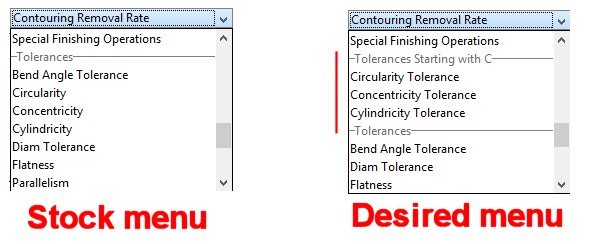
To make this change:
- Go to
<apriori_install>\ext\project-management-plugin\macro\app\ConfigureHeatMapand make a back-up copy ofconfigHeatMap.xml. -
Open
configHeatMap.xmlin an editor and scroll down to these lines:<HeatMapToolSpec name="circularity"> <GroupingSpecs> <GroupingSpec name="i18n(gtol)"/> </GroupingSpecs> </HeatMapToolSpec> <HeatMapToolSpec name="concentricity"> <GroupingSpecs> <GroupingSpec name="i18n(gtol)"/> </GroupingSpecs> </HeatMapToolSpec> <HeatMapToolSpec name="cylindricity"> <GroupingSpecs> <GroupingSpec name="i18n(gtol)"/> </GroupingSpecs> </HeatMapToolSpec> -
Modify these lines as shown in bold (don’t miss the “_c” after “gtol”):
<GroupingSpecs>and save this file When you finish.<HeatMapToolSpec name="circularity" displayName="i18nMsg(circularity)"> <GroupingSpecs> <GroupingSpec name="i18n(gtol_c)"/> </GroupingSpecs> </HeatMapToolSpec> <HeatMapToolSpec name="concentricity" displayName="i18nMsg(concentricity)"> <GroupingSpecs> <GroupingSpec name="i18n(gtol_c)"/> </GroupingSpecs> </HeatMapToolSpec> <HeatMapToolSpec name="cylindricity" displayName="i18nMsg(cylindricity)"> <GroupingSpecs> <GroupingSpec name="i18n(gtol_c)"/> </GroupingSpecs> </HeatMapToolSpec> -
Go to
<apriori_install>\ext\project-management-plugin\macro\app\ConfigureHeatMap\Messagesand make a back-up copy ofmacroMessages.properties. -
Open
macroMessages.propertiesin an editor and scroll down to this line:HeatMap.gtol=Tolerances -
Make copy of this line and edit it so that you end up with two lines as follows:
HeatMap.gtol=TolerancesHeatMap.gtol_c=Tolerances Starting with C -
Add the following lines at the end of the file: -
Save the file When you finish and restart aPriori
The Criterion menu should now reflect the changes requested.