Error Messages
You may encounter the following types of error when you use aP Pro:
- Geometry Errors: Not Supported GCDs
- Feasibility Failures
- Handled Exception Errors
- Unexpected Exception Errors
- Error Message Limitations
Tip:
See also the Understand Error Messages aP Academy training course.
Geometry Errors: Not Supported GCDs
Geometry errors appear in the form of Not Supported GCDs in the Geometric Cost Drivers pane. For example:
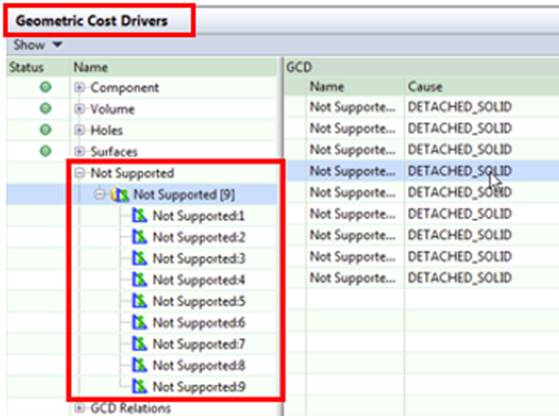
This shows a list of Not Supported GCDs. As with other GCDs, aP Pro uniquely names and groups these occurrences, so you can quickly identify and investigate them.
The right pane in this screen shows the cause associated with the error source. For example:
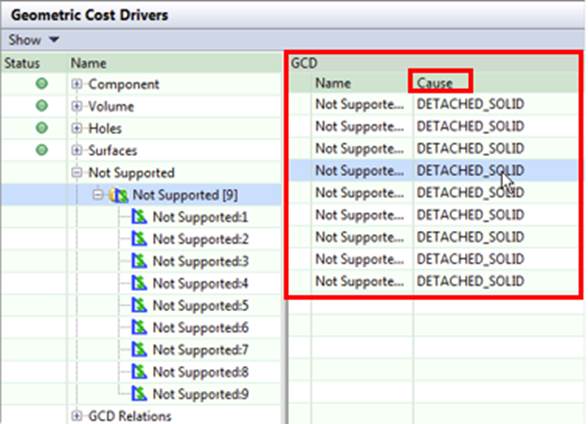
In this example, the cause is DETACHED_SOLID, meaning that multiple bodies exist in the model. Only the largest body is used, and the remainder are ignored. This is a result of the default “free body” processing mode.
To resolve Geometry errors, you need significant experience using aP Pro. So we suggest you liaise with your aPriori account representative for additional guidance.
For a full list of possible causes, see Unsupported GCD Messages.
Feasibility Failures
The error message tree includes feasibility failure messages. These failures do not necessarily stop costing and are often a normal part of aPriori's costing and analysis. During a typical costing, aPriori evaluates many feasibility rules to aid in the selection of:
- Material and stock
- Process routing
- Machine
- Operation assignments
Note:
aPriori always picks the most efficient overall routing for your design; however, some operations in the routing may not be specifically optimized.
You can find the reasons for feasibility failures by expanding nodes of the message tree: select Show Messages from the View menu. Look for nodes that have the icon .
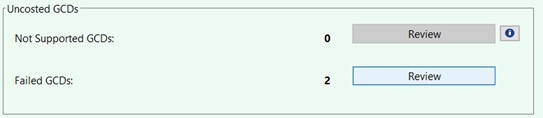
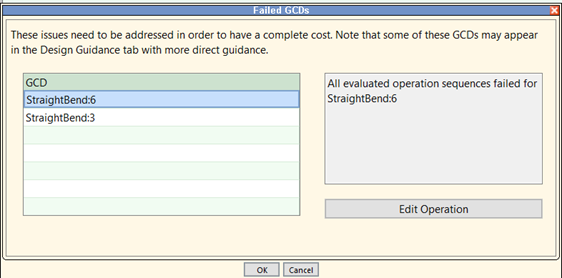
When no feasible operation can be found for a given GCD, information appears in the Uncosted GCDs section of the Validation tab, under Failed GCDs.
When all available operation sequences fail to successfully complete a GCD, the following message is displayed: “All evaluated operation sequences failed for {gcdName}”. Exception: if only a single operation sequence is evaluated—either because it is pinned or the only one available—aPriori presents the specific error message associated with that sequence.
The failure message is available in multiple locations:
-
Validation Tab Failed GCDs Section:
-
GCD failure tooltip, hover over the red x to show the message:
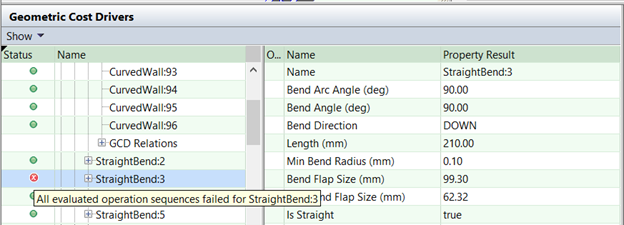
When a GCD fails and only one operation sequence was evaluated, a more-specific error message will be displayed in the relevant dialogs and tooltips:
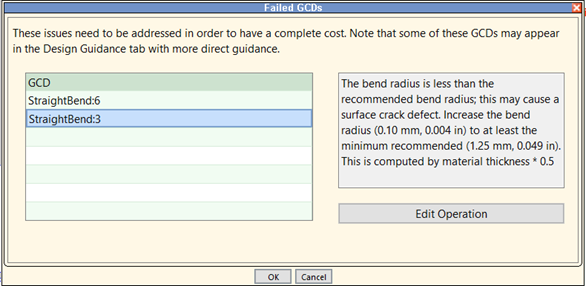
There are two ways you can investigate why a specific operation sequence fails (is considered infeasible):
- Manually select (“pin”) that specific operation sequence and re-cost.
- Open the message tree (via View Show Messages) and navigate to the GCD of interest. Then review the various messages related to each operation that was evaluated.
See also the second example error message in Example: Costing Failures.
Handled Exception Errors
Handled Exception errors typically show missing information that is required during costing. For example:
- A value or group of values missing from a lookup table.
- A geometry property that has not been inputted correctly.
- A required machine property that has not been captured.
These errors are considered handled, as the requirement for information can be predicted, allowing aPriori to alert users when they must take action to provide missing information.
These messages appear in the message tree: select Show Messages from the View menu.
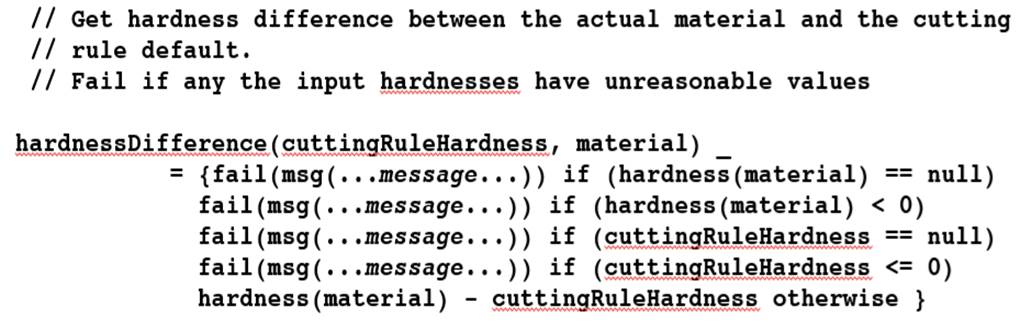
Example: Material Hardness
The code below ensures that the hardness of the current material meets the hardness requirements of a particular type of operation. A failure sequence message is shown if the material hardness is outside the predetermined window of expected values or if information on the material's hardness is missing (null or < 0).
Unexpected Exception Errors
In rare cases, Unexpected Exception errors can be caused by software defects (for example, when the code fails to handle a particular null condition). To resolve these errors, contact your Customer Success Manager.
Error Message Limitations
In some circumstances, error messages may not be available for users to view due to access controls (permissions) or other security settings.