Guidelines and principles for access control
Before trying to implement a complete model that addresses all the access requirements for your entire organization, do the following:
- Study the content of this section and get a good understanding of it before proceeding
- Involve aP Pro Services in planning and implementing any Access Control model for your site.
When learning aPriori Access Control, a good practice is to keep It simple. In a test environment, try implementing a single permission for a small group, and once it works the way you want, try new configurations.
As with every new feature, you should master and validate this functionality in a test environment first and roll it out to your production environment only when you are sure that it works. Try rolling it out to a small pilot group of advanced users initially. Like most access control systems or powerful programming languages, aPriori Access Control does not prevent you from defining a rule that is not logical.
Access control principles
aPriori Access Control incorporates the following principles to protect your data and to provide security without being a burden to your users.
- Users cannot grant themselves new permissions as a result of updating a resource. For example, users cannot change the value of an attribute to give themselves Update rights if they did not have those rights already.
- Users cannot give away permissions that they had because of updating a resource. For example, if users have Read + Update rights, they cannot change the value of an attribute so that they can no longer Read or Update it.
-
Fail fast when possible: For example, in order to BOM load, users need to be able either to Create and Read and/or update the parent roll-up and potentially any functional group roll-ups. aPriori checks these conditions up front and fails immediately if it finds a problem, before starting the BOM load operation.
- When a BOM load creates a new scenario for an existing part, it does so by copying from the existing part. If your site has implemented Access Control, in some situations this can cause the BOM load to fail due to an Access Control error. Note that Read privileges are checked against the existing component, to which you may not have access.
-
Keep going and notify: Once past the initial "fail fast" checks, for operations that involve manipulation of multiple scenarios, aPriori skips over scenarios that fail due to Access Control but logs the issue and notifies the user. For example, after the initial check for roll-ups, the BOM loader loads everything it can and notes any access control failures.
-
Abort the entire operation: If any part of an Update operation fails due to Access Control, the entire operation is aborted and aPriori attempts to clean up (delete) any scenarios created up to that point. For example, Scenario > Save As > Scenario & Children could fail an Access Control check after already processing some number of scenarios. In this case, aPriori stops the save and cleans up any scenarios that were created. (Spreadsheet reports work in the same manner, except that there is no need to clean up.)
-
"Fail fast when possible" does not apply in this situation for performance reasons. It would not be efficient to visit each scenario to check if all permissions are okay before performing the Save operations.
-
Check before destroy: aPriori checks Access Control permissions before deleting data. For example, using File > Import to import scenarios from an ".ap" file will delete any existing scenarios that conflict with the ones being imported. Before performing the delete, aPriori verifies that the importing user has the necessary permissions for the entire import to succeed.
Guidelines to rules
In addition to the principles listed in the previous section, there are some basic Access Control rules to remember:
- If you change the Access Control permissions for users who are logged into the system, the changes will not affect them until they log out and log back in again.
- Users can belong to multiple groups. Every aPriori user belongs to at least one group: All Users. But most users also get assigned to one or more other groups that reflect something like the organization’s regions, or projects, or job function.
- A user who belongs to a sub-group automatically belongs to all that sub-group's parents, grandparents, and so on.
-
To have access permission to a resource, a user must:
-
belong to at least one group that grants that permission,
-
Not belong to any group that denies that permission with Strong Deny
-
The most restrictive permission is the one that counts. For example, a user might belong to one group that allows him or her to update a component, and to another group that explicitly prohibits (Strong Deny) updating that component. In this case, the "deny" permission takes precedence and the user cannot update the component.
There are two modifiers called "Grant" and "Deny" that allow you to fine-tune this behavior. See "Grant/Deny modifiers" for more information. Also note that a given group can have multiple permission definitions consisting of the same action and the same resource, but with different rules.
Important:
Group Inheritance vs. "Most Restrictive Permission Wins"
A user who is a member of a sub-group is also automatically a member of all of that subgroup's parents. For example, a user belongs to a subgroup that grants Read + Update permission to a component, but the parent group grants ONLY Read access?
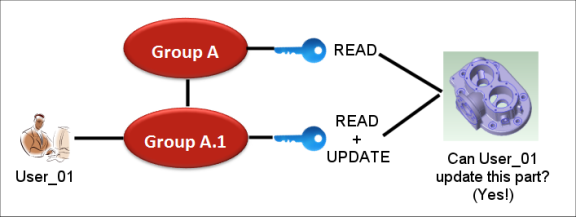
By default, the user is not prevented from updating the component because the Read permission of the parent group does not explicitly deny Update access to the user, it simply does not grant update access to its members. So, somebody who is a member of only the parent group will not be able to update the component, but somebody who is a member of the sub-group can. The parent permission does not grant it, but it does not deny it either. Further note that there is nothing special about parent-child group relationships when it comes to permissions. The permissions for each group are evaluated independently for each group, regardless of whether they are peers, or parent-child, or completely unrelated.