Managing Unit System Settings
By default, the aPriori interface displays quantities by using the following basic units:
- Length: millimeters
- Mass: kilograms
- Time: seconds
- Temperature: degrees Celsius
Use the Unit System Settings dialog to change the units used to display quantities. You can also use this dialog to change the number of decimal places used to display quantities (see Change Decimal Place Settings).
Change the units used to display quantities
-
From the View menu, select Unit System Settings….
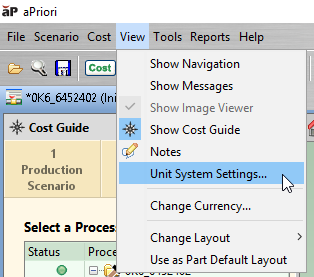
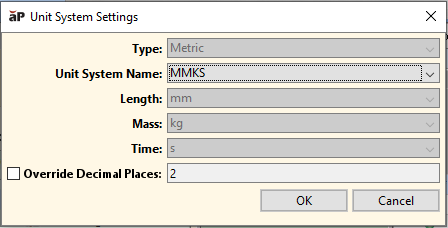
The Unit System Settings dialog appears:
-
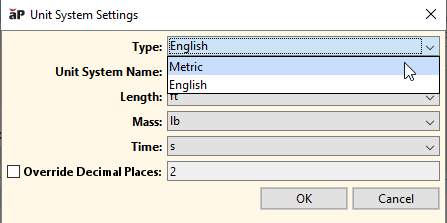
From the Type dropdown list, select English or Metric
-
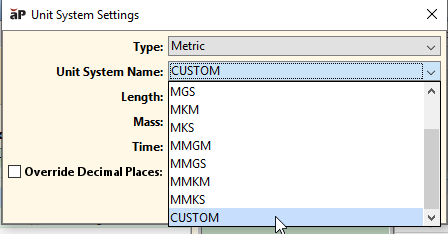
From the Unit System Name drop-own list, either select one of the predefined unit systems or select Custom. If you select Custom, units for length, mass, and time can be edited independently.
-
If you selected a predefined unit system in the previous step, the fields for Length, Mass, and Time are automatically populated. See Predefined Unit Systems.
If you selected Custom in the previous step, select a unit from each of the dropdown lists for the Length, Mass, and Time fields.
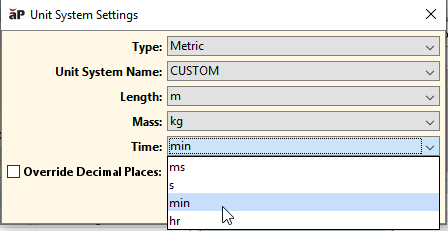
See also Custom Unit Systems.
-
Click OK
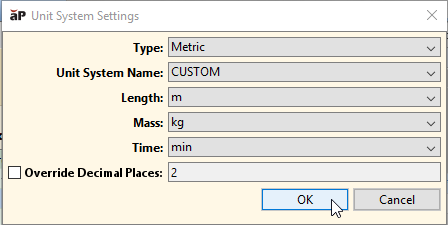
The units specified in the Length, Mass, and Time fields used in the display of quantities in screens and dialogs for aP Pro and aPriori Digital Factory Manager. This includes quantities whose unit type is defined with generic compound unit types such as Area, Cost Per Area, Cost Per Mass, and Density.
Note:
Certain values, for example Batch Setup Time, have specified units that remain unaffected by unit change settings.
For example, the units shown in the Part Details tab reflect the selections made in the Unit System Settings dialog:
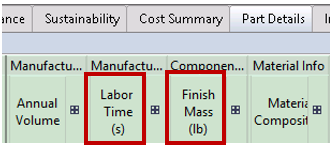
If you change the value in the Type field, quantities with the unit types Temperature, Force, Energy, Power, and Pressure are displayed using different units, as indicated in the following table:
| aPriori unit type | System unit | English unit |
|---|---|---|
| Temperature | Celsius | Fahrenheit |
| Force | newton | pound (lbf) |
| Energy | joule | BTU |
| Power | joule/second | BTU/second |
| Pressure | MPa | PSI |
See also Displays are Affected by Unit System Changes.
Predefined Unit Systems
The following tables show the predefined unit systems:
Metric:
| Name | Length | Mass | Time |
|---|---|---|---|
| CGM | centimeter | gram | minute |
| CGS | centimeter | gram | second |
| MGM | meter | gram | minute |
| MGS | meter | gram | second |
| MKM | meter | kilogram | minute |
| MKS | meter | kilogram | second |
| MMGM | millimeter | gram | minute |
| MMGS | millimeter | gram | second |
| MMKS | millimeter | kilogram | second |
English:
| Name | Length | Mass | Time |
|---|---|---|---|
| FPM | foot | pound | minute |
| FPS | foot | pound | second |
| IOM | inch | ounce | minute |
| IOS | inch | ounce | second |
| IPM | inch | pound | minute |
| IPS | inch | pound | second |
Additional choices also may be available in the Unit System Name field, if your system administrator has defined any custom unit systems.
Custom Unit Systems
When you use the Unit System Settings dialog, and you specify Custom for the Unit System Name, you can specify the following units for the Length, Mass, and Time fields:
Length:
-
Metric units:
- millimeter (mm)
- centimeter (cm)
- meter (m)
-
English units:
- inch (in)
- foot (ft)
Mass:
-
Metric units:
- gram (g)
- kilogram (kg)
-
English units:
- ounce (oz)
- pound (lb)
Time:
- millisecond (ms)
- second (s)
- minute (min)
- hour (hr)
Displays are Affected by Unit System Changes
When you change unit system settings, the changes apply to most quantities displayed in the Pro and Digital Factory Administrator interfaces, including the Cost Guide, the main data tabs (Part Summary, Cost Summary, Part Details, Investment, Validation and Design Guidance), the Process Options Editor, the Material Selection dialog, Material Nesting and Flat Outline dialogs, and the Formula Dependencies dialog.
The changes apply to all quantities whose Unit Type Name is defined in terms of the following unit types:
- Length
- Mass
- Time
- Temperature
- Force
- Energy
- Power
- Pressure
See the Unit Type Name fields in, for example, Formula tables, Material Type tables, and Machine Type tables, in the Cost Model Workbench.
Note:
In some cases, specific units (such as hr) appear in the Unit Type Name field rather than unit types (such as Time). In such cases, the specified, specific units are used regardless of the unit system setting.
Changing unit system settings affects only displayed values. It does not impact the values of any data stored in a Digital Factory.