Mapping BOM loader headings
You can map BOM loader headings to the UI and spreadsheet reports.
The table Mapping BOM Loader Headings to the UI and Spreadsheet Reports
lists all of the aPriori column headings that can be mapped to the columns in your BOM input file. These appear on the aPriori Field drop-down menu.
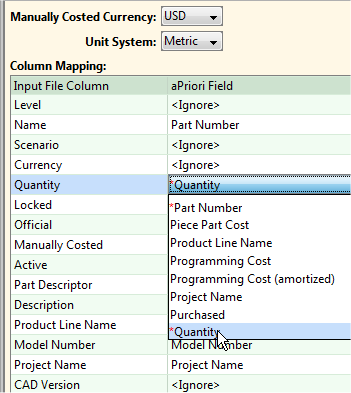
If your site has implemented any User Defined Attributes (UDAs), they also will appear on the drop-down menu.
The three required fields (Level, Part Number, and Quantity) are highlighted with red asterisks (*) in the table, the same as they appear in the menus (see the screenshot above). If your site has implemented any required UDAs, they also will appear with red asterisks.
Some of the following fields accept "true" or "false" values, as indicated by (True/False) in the description. It is best practice to use the syntax "true" and "false". If needed, there is additional acceptable syntax. True can be specified as a case-insensitive string true, yes, or 1. False can be specified as a case-insensitive string false, 0, or a blank field.
Note:
Some of the names on the drop-down menu (the entries in the Name on "aPriori Field" menu: column) may have been redefined in your deployment. The following table lists the default names as shipped with aPriori. (To modify display names, use the Digital Factory Administrator feature at Tools > Digital Factory Toolset> Deployment Data> Cost Taxonomy Display Names.)
Unless otherwise specified, the UI name is identical to the name on the "aPriori Field" menu.
Mapping BOM Loader Headings to the UI and Spreadsheet Reports
| Name on "aPrioriField" menu: | Found in the UI: | Spreadsheet Report Variable Name used in XML definition: | Description: |
|---|---|---|---|
| Active | Detail View: Cost Descriptors | active | (True/False). Applies to CAD-connected components. An Active scenario automatically updates whenever the CAD part changes. Setting a part to Inactive means that GCDs remain static even if the CAD part is updated and must be updated manually before changes to the CAD files will be reflected in the Bulk Cost operation. |
| Additional Amortized Investments | Detail View: Fixed Costs | additonalAmortizedInvestment | Fixed Investment Costs incurred to make a part that are not accounted for in Hard Tooling Programming or Fixture Costs amortized over the estimated lifetime production volume. aPriori baseline cost models do not calculate Additional Amortized Investments. |
| Additional Direct Costs | Detail View: Variable Costs, Other | additionalDirectCosts | Other costs that can be specifically associated with the manufacture of a given design. Expendable Tooling Cost per part, Additional Direct Costs, and Extra Costs are accounted for in Other Direct Costs (see below). Default value is zero. |
| Amortized Batch Setup | Detail View: Variable Costs | setupCostPerPart | The cost of configuring a machine to run a batch of a given design, accounting for machine downtime and labor incurred. The cost is amortized to individual parts or assemblies by dividing by the number of components in a batch. For example: (Setup Time * (Labor Rate + Direct Overhead Rate)) / Batch Size |
| Annual Volume | Detail View: Manufacturing Info | annualVolume | Number of parts to be produced in one year |
| Component Height | Geometric Cost Drivers | part.height | The shortest dimension of the component A general way to export GCDs for Spreadsheet Reports is to use the following syntax: <Formula>gcd.parameter</Formula> where parameter is the information related to a GCD you want to export. Note: You may encounter aliases for this variable named part.boxHeight or part.envelopeHeight. |
| Component Length | Geometric Cost Drivers | part.length | The longest dimension of the component Note: You may encounter aliases for this variable named part.boxLength or part.envelopeLength. |
| Component Surface Area | Geometric Cost Drivers | part.surfaceArea | The total surface area of the component |
| Component Volume | Geometric Cost Drivers | part.volume | The total finished volume of material in the component |
| Component Width | Geometric Cost Drivers | part.width | The second longest dimension of the component Note: You may encounter aliases for this variable named part.boxWidth or part.envelopeWidth. |
| Consumable Process Carbon | Part Details: Carbon Info | consumableProcessCarbon | The process carbon attributed to any consumable materials required in the processes to manufacture the component |
| Copy From | Cost Guide: Recently Used Settings | N/A | The costed component from which to copy the cost settings, in the format: PartName.Scenario |
| Cost Type | Detail View: Cost Descriptors Cost Guide: Company-Defined Attributes |
costType | The source that provided the cost information for the component. Choice of Design Engineering, Manufacturing, Procurement, Accounting/Finance, Program Management, Supplier, Other. |
| Currency | Detail View: Applies to all monetary fields EXCEPT in the "Quoted Info" section. Cost Guide: Currency pull-down menu "View" menu > Change Currency? Tools >Digital FactoryToolset> Deployment Data> Currency |
currencyCode | Select the currency used for the costs in this row. These values will be converted to the default display currency inaPrioriand will be shown in italic. Fields in the "Quoted Info" section can be set separately with "Quoted Currency" (see below). See the "Managing Currencies" section of the "Deployment Data" chapter of theaPrioriDigital FactoryAdministration Guidefor more information. |
| Date Costed | Detail View: Cost Descriptors | calculationDate | The date and time in the format: MM/DD/YYYY hh  ss ss |
| Description | Detail View: Cost Descriptors Cost Guide: Company-Defined Attributes |
description | Information that will help you identify the component. "Description" can be mapped to a CAD "description" property. See the "Using CAD Properties" chapter of theaPrioriSystem Administration Guide. |
| Direct Overhead | Detail View: Variable Costs | directOverheadCost | Direct overhead accounts for machine depreciation, machine maintenance, and energy to power machines. In addition, you have the option of including facilities cost (rent, insurance, and utilities) in direct overhead, which by default is included in indirect overhead (see below). |
| Electricity Process Carbon | Part Details: Carbon Info | electricityProcessCarbon | The process carbon attributed to the electricity required by the processes to manufacture the component |
| Expendable Tooling | Detail View: Variable Costs, Other | expendableToolingCostPerPart | The cost of tooling, such as a drill bit or turret press punch, consumed during manufacturing |
| Extra Costs | Detail View: Variable Costs, Other | extraCosts | Total of additional miscellaneous costs. By default, this value is zero in aPriori baseline point cost models. Your Digital Factory may be customized to use this field to capture specific types of costs and relabeled as needed (see the aPriori Administration Guide, Managing Cost Taxonomy Display Labels). |
| Finish Mass | Detail View: Component Mass | finishMass | The total finished mass of material in the component based on the final manufactured “Component Volume” and selected Material. |
| Fixture Cost | Detail View: Capital Costs | fixtureCost | The cost of devices that hold a specific part or assembly in the correct orientation on a machine during manufacture or assembly. These devices are not supposed to be re-used for a part or an assembly of a different design. The capital cost is the price to buy one set of the tooling. |
| Fixture Cost (amortized) | Detail View: Fixed Costs | fixtureCostPerPart | The cost per part of devices that hold a specific part or assembly in the correct orientation on a machine during manufacture or assembly. These devices are not supposed to be re-used for a part or an assembly of a different design. |
| Fully Burdened Cost | Detail View: Fully burdened | fullyBurdenedCost | For parts, the sum of Piece Part Cost and Fixed Costs. For assemblies, the sum of Fully Burdened Cost of Assembly Processes and Fully Burdened Cost of Subcomponents. For Roll-ups, the sum of Piece Part Cost and Fixed Costs for all first level children (parts, assemblies, roll-ups). |
| Functional Group | See "Description". | See "Description". | "Functional Group" is used to map components to an alternative hierarchy or grouping from the BOM structure. Components being loaded via the BOM Loader can be mapped to specific functional groups. Functional groups must be defined inaPrioriusing the Functional Group Generator. See the "Using Functional Groups" section of theaPrioriUser Guide. |
| Hard Tooling | Detail View: Capital Costs | hardToolingCost | Hard tools are purchased for creating one specific design and cannot be used to create others. The Capital Cost is the price to buy one set of the tooling. |
| Hard Tooling Amortized | Detail View: Fixed Costs | toolingCostPerPart | The cost of hard tooling per part |
| Image File Path | Component View | N/A -- There is no "image file path" to extract once the image is in the database. However, you can incorporate the image into your report by specifying: generateThumbnails="true" The image file will be generated in the same directory as the report. |
The location of an image file that you wish to associate with a CAD-less (virtual) part or assembly. Supported image formats are: BMP, WBMP, JPG, JPEG, PNG, GIF. This image will appear where a CAD-related component typically displays a representation of the CAD model, such as the Component Viewer or Search dialog in the mainaPrioriGUI. |
| Indirect Overhead | Detail View: Period Costs | periodOverhead | Indirect overhead accounts for support services for quality, maintenance, planning & purchasing, manufacturing engineering (CNC programming and process planning), and tool crib. By default, indirect overhead also includes facility costs (rent, insurance, and utilities), but you have the option of moving facilities cost to direct overhead. |
| Labor | Detail View: Variable Costs | laborCost | The cost of labor needed to manufacture the part or assembly. Usually includes hourly wages and benefits. |
| Level* | Detail View: Cost Object | bomDepth | *Required. Indicates depth within a BOM structure, with 1 or 0 being the top level. Note: If you specify "0" as the top level, the Spreadsheet "bomDepth" top-level will be "1", and all other bomDepth values will be incremented by 1. Also, there is a Spreadsheet Report "Level" which is different than the BOM and UI "Level". |
| Logistics | Detail View: Variable Costs | logisticsCost | The cost of transportation between supply chain facilities |
| Logistics Carbon | Part Details: Carbon Info | logisticsCarbon | The carbon attributed to the logistics process to manufacture the component |
| Manually Costed | Cost Guide: Basic Options (Process Group) | manuallyCosted | (True/false) Indicates that costs are specified manually and are not affected by changes to the component's GCDs, non-geometric cost drivers, orDigital Factorydata |
| Margin | Detail View: Period Costs | margin | Profit built into the component cost estimate. By default, this is zero in Priori baseline cost models. |
| Material Carbon | Part Details: Carbon Info | materialCarbon | The carbon attributed to the raw material required to manufacture the component |
| Material Cost | Detail View: Variable Costs | materialCost | The cost of the material used to manufacture the part. Includes allocation of scrap material wasted during manufacturing. Does not include consumable material, such as weld wire or adhesives, only primary material. |
| Material Overhead | Detail View: Variable Costs, Other | materialOverheadCost | Additional cost attributed to purchasing, receiving, handling, storing, and delivering materials used in production |
| Model Number | Detail View: Cost Descriptors Cost Guide:Company-Defined Attributes |
modelNumber | Unique identifying name or number for the component |
| Official | Detail View: Cost Descriptors | official | (True/false) Specifies that this is the "Official" scenario, which in over-simplified terms is the scenario that will roll-up into an assembly or roll-up by default. See the section "Working with official scenarios" in theaP Pro User Guidefor more detailed information. Note that if a component has not been initialized, the first scenario specified in the BOM Loader is made official even if this field is False. If a subsequent scenario in the BOM Loader is marked “Official” for the component, it will supersede the official status of the first scenario. The BOM load is processed by the order of the rows, top to bottom. |
| Other Direct Costs | Detail View: Variable Costs, Other | otherDirectCosts | The subtotal of Expendable Tooling, Additional Direct Costs, and Extra Costs |
| Other Process Carbon | Part Details: Carbon Info | otherProcessCarbon | The process carbon attributed to any secondary sources. This includes sources of carbon not related to electricity to manufacture the component. |
| Part Number* | "Name": Detail View: Cost Object "Part Number": Create a Virtual Part dialog "Name/Part #": Search dialog. |
partNumber | (*Required.) Unique identifier for the component; the component identifier as specified in the CAD model. Maps to "Name", "Part Number", or "Name/Part #" in different areas of the UI. |
| Piece Part Cost | Detail View: Period Costs | pieceCost | The sum of all costs of making a part, including margin if applied, but excluding Fixed (tooling-related) Costs |
| Product Line Name | Detail View: Cost Descriptors Cost Guide: Company-Defined Attributes |
productLineName | The product line on which the component is used |
| Programming Cost | Detail View: Capital Costs | programmingCost | Cost of creating a computer program that Computer Numerical Control (CNC) machines will follow to make or assemble parts of a specific design |
| Programming Cost (amortized) | Detail View: Fixed Costs | programmingCostPerPart | Programming Cost per part |
| Project Name | Detail View: Cost Descriptors Cost Guide: Company-Defined Attributes |
projectName | The name of the project associated with this component |
| Purchased | Detail View: Manufacturing Info Cost Guide: Company-Defined Attributes |
purchased | (True/False) Set to TRUE if you are purchasing this component from a supplier. FALSE indicates that you are making the component at one of your company’s factories. |
| Quantity* | Detail View: Cost Object | countInParent | (*Required.) Quantity of the component identified in the Part Number field. Typically has a value of ‘1’ unless the Part Number is a component within an Assembly and appears multiple times in the assembly. |
| Quoted Annual Volume | Detail View: Quote Info | quotedAnnualVolume | The quoted number of components to be produced per year |
| Quoted Currency | Detail View: Applies to monetary fields ONLY in the "Quote Info" section Cost Object Info window, Quoted Cost tab: Currency pull-down menu "View" menu > Change Currency Tools >Digital FactoryToolset> Deployment Data> Currency |
quotedCurrencyCode | The currency used for the quoted costs. All other monetary fields are controlled by "Currency" (see above). See the "Managing Currencies" section of the "Deployment Data" chapter of theaPrioriDigital FactoryAdministration Guidefor more information. |
| Quoted Date | Detail View: Quote Info | quotedDate | The date of the quote |
| Quoted Factory (Source) | Detail View: Quote Info | quotedFacilityName | The factory or source for the quoted cost information |
| Quoted Material Composition | Detail View: Quote Info | quotedMaterialComposition | The material used to create the quoted cost |
| Quoted Routing | Detail View: Quote Info | quotedProcessRouting | The process used to create the quoted cost |
| Quoted Total Capital Investment | Detail View: Quote Info | quotedCapitalInvestment | The total quoted capital investment cost to manufacture the component |
| Quoted Total Cost | Detail View: Quote Info | quotedFullyBurdenedCost | The total quoted cost to manufacture the component |
| Revision | Detail View: Cost Descriptor Cost Guide: Company-Defined Attributes |
revision | The revision number for the component. "Revision" can be mapped to a CAD "revision" property. See the "Using CAD Properties" chapter of theaPrioriSystem Administration Guide. |
| Scenario | Detail View: Cost Object | scenarioName | The name of the scenario which this row defines. You can specify multiple scenarios for a single part or assembly; each scenario requires a different row. |
| SG&A | Detail View: Period Costs | sgaCost | Sales, general, and administrative expenses per part |
| Target Cost | Detail View: Cost Targets Cost Guide: Targets |
targetCost | How much you want or expect the fully burdened cost of the part to be, for comparison against costing results |
| Target Mass | "Target Finish Mass" Detail View: Mass Targets Cost Guide: Targets |
targetFinishMass | How much you want or expect your finished component to weigh, for comparison against costing results |
| Total Amortized Investment | Detail View: Fixed Costs | amortizedInvestment | The sum of all fixed costs. Fixed costs must be incurred before the start of manufacturing. InaPriori, all fixed costs are amortized to the individual part or assembly by dividing the total, up-front cost for the fixed cost (the capital cost) by the total product volume. |
| Total Capital Investments | Detail View: Capital Costs | totalCapitalInvestment | The total capital investment cost to manufacture the component |
| Total Variable Costs | Detail View: Variable Costs | totalCost | The sum of all cost items for a part, Total Variable Costs is the marginal cost associated with making “one more” part of a give design. This includes all variable costs associated with the creation of a part but does not include depreciation of capital tooling. |
| Type | "Cost Object Type" Detail View: Cost Descriptors |
scenarioType | Valid entries are Assembly, Part, or BulkItem. Note: "BulkItem" is provided for backward compatibility and maps to "Part" when you import the BOM. |