Update Overlay Inheritance
You must update inheritances in overlay Digital Factories after any new versions of an existing RDL are introduced to your aPriori environment.
Important:
If you do not update these inheritances, costing activities may fail for that Digital Factory.
Seeing When an Update is Needed
The inheritance entries in the display for an overlay Digital Factory may have Update to Latest buttons:
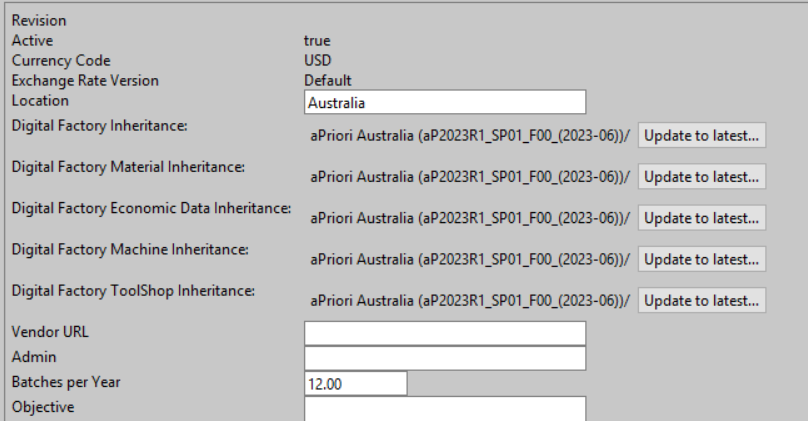
These buttons appear:
- If you or another admin have loaded a newer Regional Data Library or have installed a baseline update for your Digital Factories.
- If you export this overlay Digital Factory and import it into a newer environment.
Button Meanings
The Update to Latest button has the following meanings:
- For Material, Economic Data, Machine, and Toolshop inheritance: this tells aPriori to use the latest Digital Factory Data available in the database for this Digital Factory.
-
For Digital Factory Inheritance : this applies to the CSL/Base Digital Factory and tells aPriori to use the Cost Model Versions (CMVs) that ship with the latest RDL.
Note:
This does not change the actual CMV being used, as you may have performed some customizations which require extra upgrade work.
Updating to Latest
To perform these updates
- Click the Update to Latest buttons.
- Publish the Digital Factory to save the changes.