Basic rules for Access Control of Access Control
When creating sub-groups of the system defined All Administrators group, mimic the structure that you have created for your users. For example, if you have created groups for your users based on regions such as USA, UK, and China, do the same for your administrators:

The Super-Users group is automatically created by aPriori during installation.
-
Only allow members of the Super Users group to CREATE, UPDATE, or DELETE permissions.
-
By default, only members of the Super-Users group have strongGrant permission to associate permissions. Other administrators can associate permissions, but only in their regions (this is controlled by Update permissions to the groups that represent regions).
-
Try to use parameterized permissions; do not use permission-specific rules by specifying the name of the permission. However, if you must use permission-specific rules then you should write an Associate (Add to Group) rule for every permission (that is, that says who can associate it).
The following is a summary of the requirements for various aspects of Access Control of Access Control:
Create a Group or Permission
You need a CREATE permission defined on the Group and Permission resource types. (If you create a subgroup, you will need an UPDATE permission on the parent group.)
Delete a Group or Permission
You need a DELETE permission defined on the Group and Permission resource types.
Update a Group
You need an UPDATE permission on the Group resource type.
Updating a group includes the following:
- Adding a permission to the group or removing it.
- Changing any attribute of the group (including its name)
- Adding or removing users
Update a Permission:
To update a permission, you need:
- UPDATE permission on the Permission itself
- UPDATE permission for any Group that the Permission is in
Updating a Permission includes updating any of its attributes (name, rule, resource, action, and so on).
Note the following:
There are no user defined attributes on permissions.
Rename requires UPDATE access on the permission and UPDATE access on all associated groups since it is an update to the permission.
To Associate (Add) a Permission to a Group: you need ASSOCIATE permission on the Permission itself, and UPDATE permission on the Group.
Example configuration
Assume that you already have groups configured for your users based on a region model, and you now wish to configure your administrators. Here is the existing user group configuration:
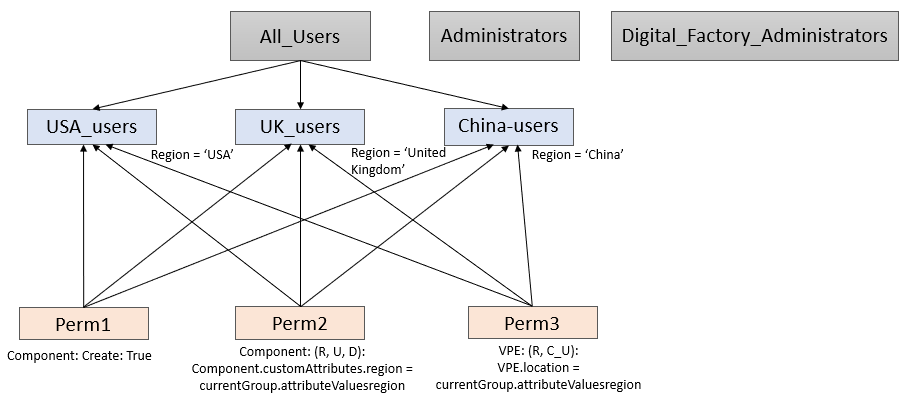
Configure your administrator groups to reflect your user groups:
In this example, three region-based administrator groups have been created to reflect the three region-based user groups. The Super-Users group is created automatically by aPriori . Each of the region-based groups has an attribute called "Region" which is set to the same value used in the user groups (for example, "USA", "China", etc.). The Super-Users group's "Region" attribute is set to "Global".
In an actual installation, you also need to create Digital Factory administrator groups. These might or might not mirror the region-based groups, depending on the requirements for Digital Factory creation, update, and delete.
Permissions for the different groups
All Users: By default, aPriori sets READ access to all Groups and all Permissions for all users:
- READ Permission true, Strong Grant
- READ Group true, Strong Grant
This is hard-coded and aPriori does not allow the creation of READ permissions on Groups and Permissions.
Super Users: By default the Super-Users group has the following permissions related to groups and permissions:
aP.Group.Create.StrongGrant: CREATE GroupsaP.Group.UD.StrongGrant: UPDATE and DELETE GroupsaP.Permission.Associate.StrongGrant: ASSOCIATE Permissions ("Associate" means "Add Permission to Group")aP.Permission.Create.StrongGrant: CREATE PermissionsaP.Permission.UD.StrongGrant: UPDATE and DELETE Permissions
Note:
Super-Users should always have strongGrant permissions on all resource types, for all actions.
Administrators: In this scenario, members of the top-level Administrators group have the following permissions:
- CREATE, UPDATE, DELETE Permission, false (these are not denied, they are simply not explicitly granted)
- ASSOCIATE ("Add to Group") Permission, If
permission.strongGrant == false(orpermission.normalgrant == true)
Note:
Non-Super User Administrators cannot associate "Strong Grant" permissions.
USA-Admins, UK-Admins, China-Admins: The regional administrators would have the following permissions:
UPDATE Groups [Normal Deny], currentGroup.attributeValues.region = Group.attributeValues.region
This rule ensures that admins can only update groups that are in their region, for example, Associate permissions to groups in their region.