Export Multiple Digital Factories
You can export multiple Digital Factories; this is particularly useful when creating local backups of configuration work done in aPriori.
Export Process
- From the Digital Factory Toolset window or the Digital Factory Manager window, select File > Export > Multiple Digital Factories.
-
Follow the prompts and the usage notes in the resulting Export Multiple Digital Factories window to:
-
Specify a folder to which the export files will be written.
-
Select the Digital Factories to export (CTRL-click or SHIFT-click to expand your selection(s).
-
Specify how to handle overlay Digital Factories: just the overlay Digital Factory itself, or the entire “bundle”; the overlay Digital Factory plus all the Digital Factories from which it inherits. In general, you should always select the entire bundle.
-
Specify a prefix for the file names.
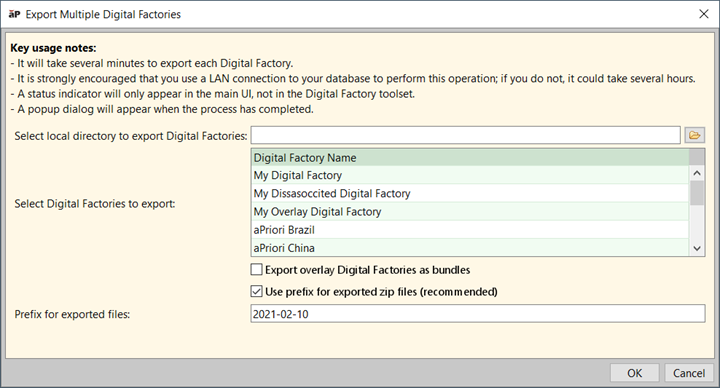
Figure: Exporting multiple Digital Factories -
-
Click OK.